About this template
List of fixed assets – asset register in Excel, Word, and PDF. Keep track of machinery, equipment, vehicles, buildings, and other fixed assets with a structured register that helps you document acquisition values, useful lives, scheduled depreciation, impairment, and disposals. The package includes a functional Excel register with automatic calculations and a reconciliation tab, printable register forms, year-end checklists, disposal logs, and guides in Swedish and English.
A list of assets may be required to ensure oversight, specification, and reconciliation in the subsidiary ledger according to Chapter 5, Section 4 of the Swedish Accounting Act (Bokföringslagen). The exact design and scope depend on the business. The Annual Accounts Act (Årsredovisningslagen), generally accepted accounting principles (god redovisningssed), and the company's K-framework govern valuation and depreciation. The Accounting Standards Board (Bokföringsnämnden) has updated K2 and K3 with implications for financial years beginning after December 31, 2025. Certain companies that previously applied K2 must therefore use K3.
Reviewed: October 12, 2026 · Document version 2.0. The template does not automate the company's choice of regulatory framework, tax depreciation, or all accounting-related assessments.
This is included in the new document package
| File type | What you get |
|---|---|
| 1 Excel workbook (XLSX) | A comprehensive asset register with space for 100 assets, period settings, straight-line depreciation formulas, disposal results, control fields, year-end summary, general ledger reconciliation, and educational examples. |
| Register form | Printable specification of fixed assets for supplemental documentation and approval. |
| Disposal/Scrapping log | Documentation for sales, scrapping, and decommissioning including book value, consideration, profit/loss, and voucher references. |
| Year-end checklist | Twelve control steps for capitalization, depreciation, impairment, balances, and accounting frameworks. |
| Product-specific user guide | Step-by-step instructions for all Excel tabs, depreciation calculations, reconciliation, annual updates, documentation, and error checking. |
| Swedish + English | The register form, disposal log, year-end checklist, and guide are available in both Swedish and English as DOCX and PDF. The English documents are adapted for Swedish accounting law. |
Total of 17 customer files: 1 XLSX + 8 editable DOCX + 8 searchable A4-PDFs. The Excel workbook is built with Swedish sheet names and is supplemented by the English user guide. English-language supporting documents governed by Swedish law.
Digital delivery: The modernized ZIP version must be connected manually by the store owner in Shopify Digital Products. Until then, the existing original files are delivered. The old files should be kept.
How does the Excel asset register work?
START tab – company, period, and framework
Enter company details, financial year-end period, and the framework applied. These settings affect the period for calculations. The choice of K2/K3 does not mean that Excel automatically adjusts all accounting principles; the user must assess useful lives and rules separately.
REGISTER tab – assets and calculations
Register up to 100 assets with unique IDs, acquisition date, commissioning date, acquisition value, residual value, estimated useful life, accumulated depreciation at the start of the period, and any impairment. For straight-line depreciation, the workbook calculates a simplified time-apportioned depreciation amount based on the provided values and period. The calculation uses 365.25 days as an approximation and must be quality-assured against the company's actually applicable depreciation principles.
For assets to be depreciated according to a specific plan, this is marked in the register, but such depreciation is not calculated automatically. Land is normally not subject to scheduled depreciation. K3 components with different useful lives should be registered separately if necessary after a documented assessment.
OVERVIEW tab – control before year-end
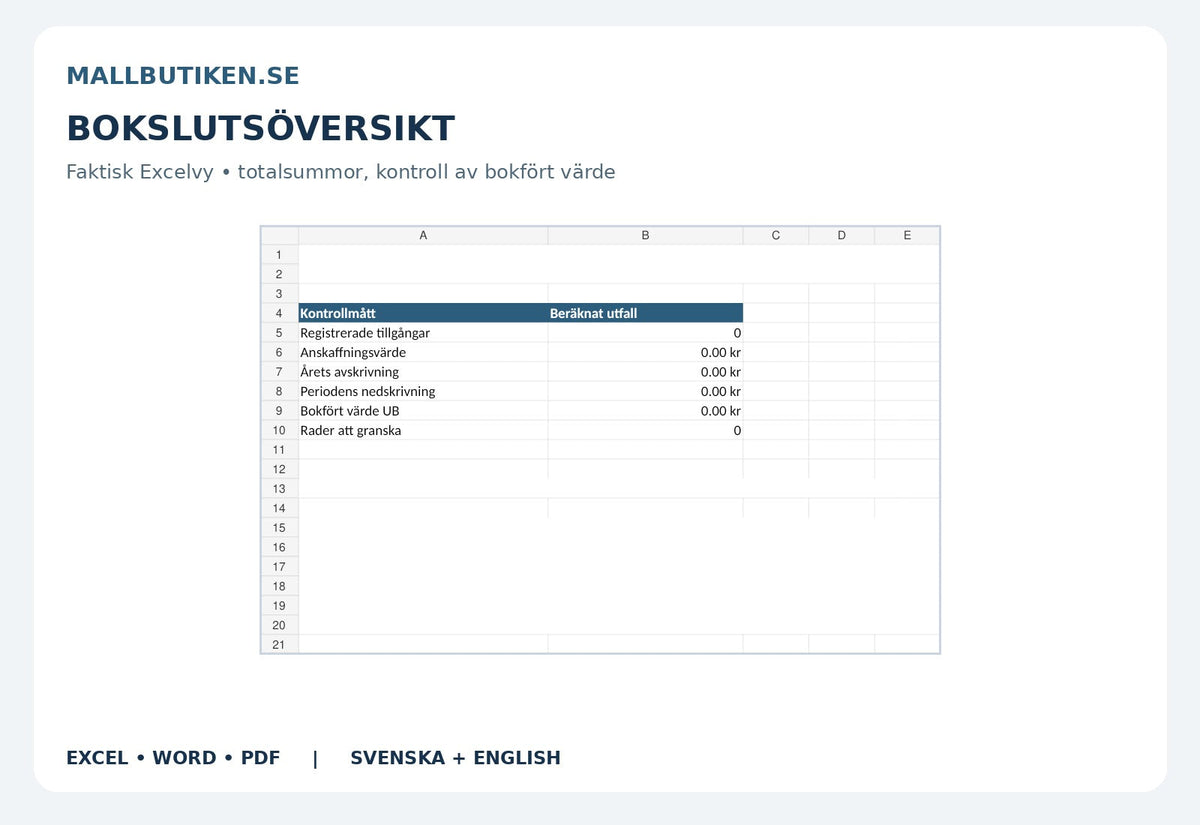
The overview automatically displays registered assets, total acquisition value, calculated depreciation and impairment during the period, closing book value, and the number of rows that need review.
RECONCILIATION tab – compare with the general ledger
The register's net values are summarized per specified BAS account. You fill in the accounting's comparable net values, including relevant contra accounts, and identify differences. Check that the general ledger and the asset register refer to the same period and that booked dispositions are included.
EXAMPLES tab – how calculations are performed
Examples show a simplified straight-line depreciation and why land is normally not depreciated. The example entries are educational and are not part of the active asset register.
Fixed assets, acquisition value, and depreciation
A fixed asset is intended for permanent use or possession in the company. The acquisition value is determined according to applicable law and accounting standards. Deductible input VAT is normally not part of the acquisition value. As a general rule, assets with a limited useful life must be depreciated systematically over the estimated period in the annual report (Chapter 4, Section 4 of the Annual Accounts Act). It is important to assess when the asset actually begins to be used, its useful life, and any residual value.
K2 or K3 – what does the user need to check?
The Accounting Standards Board's updated K2 (BFNAR 2016:10) and K3 (BFNAR 2012:1) contain specific rules and transition provisions for financial years beginning after 2025. K2 is not available to all small businesses. In relevant cases, K3 requires that significant components of a building with significantly different useful lives be reported separately. The template can document components as separate items, but it does not perform the accounting component analysis for you.
Disposal and decommissioning
Upon sale or decommissioning, the date and any consideration are recorded in Excel. The model shows a simplified result upon disposal and removes the asset's book value from the closing register when the disposal occurs within the period. The result needs to be adjusted for, among other things, sales costs, VAT, and actual accounting. The separate disposal log is used as supplemental supporting documentation for vouchers and any invoice.
Tax-related depreciation – separate from Excel
Tax rules regarding inventory (movable property) are primarily found in Chapter 18 of the Income Tax Act (Inkomstskattelagen). Inventory of minor value or with an economic life of no more than three years can in some situations be deducted immediately, but the conditions must be tested—even when purchasing multiple assets that belong together. An item of inventory that may be expensed immediately for tax purposes is not automatically handled the same way in all accounting frameworks. The Excel workbook is not a tax depreciation schedule and does not calculate excess depreciation, book-equivalent depreciation, or residual value depreciation.
How to use the document package
- Determine which accounting framework the company will apply and enter the correct financial year.
- Gather invoices, inventory lists, and the previous year's year-end and register data.
- Identify which acquisitions should be capitalized and which can be expensed immediately.
- Register each asset with a unique ID, cost, date, account, and useful life.
- Check opening accumulated depreciation and impairment against the previous year-end.
- Select the correct depreciation plan; use automatic straight-line calculation only when it suits the asset.
- Document sales and decommissionings separately and reconcile the result.
- Review warnings and control indicators in Excel.
- Reconcile register values with the general ledger and prepare the year-end checklist.
- Save the register, disposal logs, reconciliations, and relevant supporting documentation with the company's financial records.
Common questions about asset registers
Do all companies need an asset register?
The company's subsidiary ledger and documentation must provide satisfactory oversight and control according to applicable rules. The design and level of detail required depend on the business and the assets. A separate register is often an appropriate way to document this.
Can I use the Excel template for both K2 and K3?
Yes, as a register and reconciliation aid, but it does not automatically calculate all differences between K2 and K3. Component accounting, impairment, useful lives, and other assessments need to be managed by the user.
Is depreciation calculated automatically?
Yes, a simplified straight-line depreciation is calculated for registered assets where the method has been chosen and correct input data is present. Other methods require separate calculation and booking.
How is the sale of a machine handled?
Enter the disposal date and sales price in the register, fill out the disposal log, and check the simplified result against the sales voucher and current accounting and VAT rules.
Is the register ready for 100 assets?
There is space for up to 100 items without needing to copy base formulas. For larger needs, the workbook may need to be expanded and formulas and reconciliations adjusted.
Are English versions included?
Yes. The printable form and guide documents are delivered in both languages. The Excel workbook has Swedish sheet names and is supplemented by an English user guide. The regulatory framework is Swedish.
Can I use the file for the tax return's tax-based depreciation?
Not without separate calculations and checks. The workbook is primarily an accounting and year-end support tool, not a calculation of tax-based residual value or deductions.
Related templates
- Annual Report K2 – limited company
- Control Balance Sheet without auditor – Excel template
- Control Balance Sheet with auditor – Excel template
Legal basis and primary sources
- Accounting Act (1999:1078), especially Chapter 5, Section 4 and Chapter 7
- Annual Accounts Act (1995:1554), especially Chapter 4, Sections 3–5
- Accounting Standards Board – correct version of K2/K3
- Accounting Standards Board – changes in K2/K3 from 2026
- Swedish Tax Agency – immediate deductions for inventory
Reviewed October 12, 2026. Document version 2.0. The material is general documentation support according to Swedish law, not individual accounting, tax, or legal advice. Accounting and tax handling should be checked against actual circumstances. The new ZIP delivery must be connected manually by the store owner; digital original files are kept unchanged.