Svenska Dokumentmallar
Stock Discrepancy & Stock Adjustment 2026/2027 – Inventory Variance, Certification and Excel | Word/PDF
Stock Discrepancy & Stock Adjustment 2026/2027 – Inventory Variance, Certification and Excel | Word/PDF
- File format
- DOCX, PDF, XLSX
- Document language
- Five Swedish working documents Swedish User Guide and English User Guide
- Number of files
- 7
Digital download. No physical product is shipped.
Couldn't load pickup availability
About this template
Stock Discrepancy & Stock Adjustment 2026/2027 is a template package for Swedish businesses that want to document and follow up on inventory discrepancies: why the recorded stock balance differs from the actual counted quantity, how a recount was carried out, and what separate stock adjustment has been proposed or approved. Packaged in a professional Word, PDF, and Excel structure.
Price SEK 79 · one-time purchase · digital ZIP. You get 7 editable Word files (DOCX), 7 searchable print PDFs, and 1 Excel workbook (XLSX), totaling 15 customer files. No physical product, subscription, ERP integration, or automatic accounting is included.
Scope before purchase: The templates are internal control and documentation materials. They do not replace statutory inventory of goods, inventory lists, stock valuation according to applicable accounting rules, or complete accounting verifications. An Excel amount is indicative and does not establish theft, liability, or a tax basis.
When is a stock discrepancy report used?
For example, when warehouse staff or an inventory manager counts 21 units despite the stock system showing 25. The difference is then −4 units (counted minus recorded). Before the stock is adjusted, the business needs to check if the same item and unit are being compared, if returns or ongoing deliveries affect the balance, and if a new independent count is required. The template package documents this entire process.
01. Package contents
Five Swedish work templates, one Swedish user guide, and a separate English User Guide – all seven in Word and PDF – as well as an Excel register with nine tabs. Total 15 files. Product version 1.0, dated October 28, 2026.
02. What the files contain
Discrepancy report, recount protocol, root cause analysis, adjustment and approval procedure, preventive action plan, and registers for cases, amounts, and decision references. All control and responsibility decisions must be made by an authorized person.
Complete file list
| Document | Function | Format |
|---|---|---|
| Stock Discrepancy – Discrepancy Report | Difference between recorded and physically counted quantity | Word (DOCX), PDF |
| Recount – Recount Protocol | Independent recount and reconciliation of the storage location | Word (DOCX), PDF |
| Root Cause Analysis – Stock Discrepancy and Shrinkage | Basis, established facts, possible causes, and remaining questions | Word (DOCX), PDF |
| Stock Adjustment – Proposal and Approval | Manual proposal, internal authorized decision process, and separate system reference | Word (DOCX), PDF |
| Action Plan and Final Reconciliation | Preventive stock controls, responsibility, and verified follow-up | Word (DOCX), PDF |
| Swedish User Guide | Workflow, legal limitations, and sources | Word (DOCX), PDF |
| English User Guide | English user guide for the Swedish work templates | Word (DOCX), PDF |
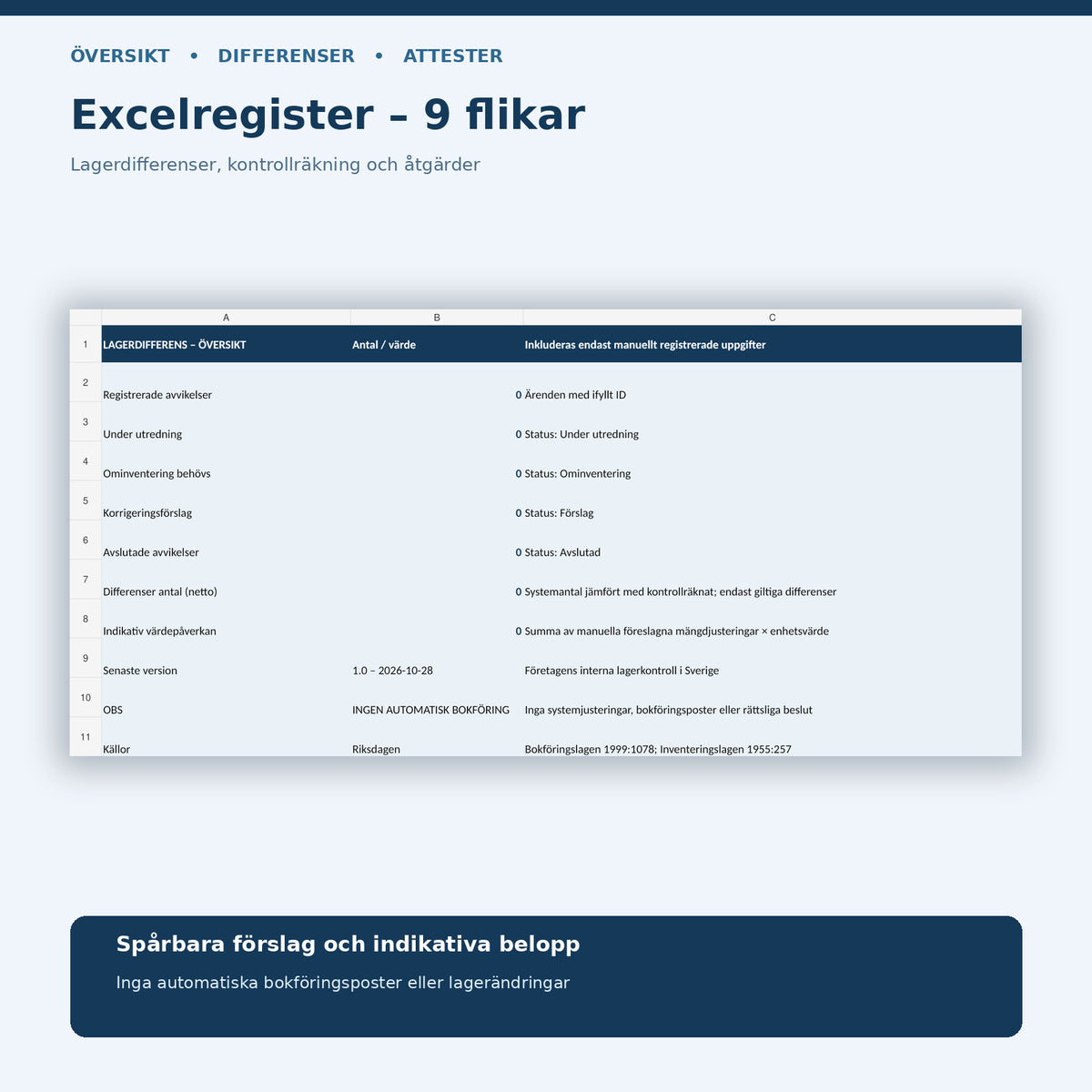
| Stock Discrepancy – Excel Register | Nine tabs for discrepancies, recounts, investigations, proposals, approvals, basis, actions, and read me | Excel (XLSX) |
Excel Register: Nine Tabs with Calculation Support
The workbook contains Overview, Discrepancies, Recount, Investigations, Adjustments, Approvals, Basis, Actions, and Read Me. The overview shows the number of recorded cases, manual statuses, and net discrepancies. On the discrepancies tab, counted quantity minus system quantity is calculated when both pieces of data are valid and non-negative.
In Adjustments, you can calculate an indicative value impact as the proposed quantity adjustment multiplied by a manually entered unit cost. Incorrect quantities or negative unit costs are displayed as control messages. Excel uses standard formulas, without macros or external data connections, and does not write to any business system.
Work systematically from discrepancy to action
- Record the discrepancy. Fill in the item ID, storage location, unit, system quantity, physical count, time, and control source.
- Perform a recount. Perform a separate count if necessary and compare identification, units, cut-off time, and ongoing stock movements.
- Investigate objectively. Review stock movements, receiving documents, returns, write-offs, and documents; separate facts from possible causes.
- Propose a correction. Document the direction and magnitude of the change, as well as the basis and any indicative impact.
- Decide and approve separately. An authorized person performs an internal review and refers to the actual stock transaction in the business system.
- Follow up. Note preventive actions, verify that the process worked, and archive relevant documents.
Legal requirements and legal limitations
The Accounting Act (1999:1078), including Chapter 4, Sections 1–2 and Chapter 5, Sections 6–9, covers the meaning of the obligation to keep accounts, good accounting practice, and verifications. The Act (1955:257) on inventory of goods for income taxation sets requirements for inventory and lists of stock assets within its scope. Valuation issues must be assessed according to applicable accounting and tax rules.
The fact that a recount shows a shortage is not in itself proof of intent, theft, liability for damages, or a specific tax cost. The customer's internal approval, business system, and accounting basis need to be handled separately. The template is not a statutory standard form and must not be marketed as a government-certified inventory.
Frequently Asked Questions (FAQ)
What is a stock discrepancy?
It is a difference between the quantity recorded in a system and the quantity actually counted during a check. The difference must be investigated because it may be due to, for example, incorrect recording, units, location, or stock movements.
How does Excel calculate the stock discrepancy?
By counted quantity minus system quantity. If the system shows 25 and the check shows 21, the discrepancy is −4. Excel flags text or negative input so that such data is not used as valid recount data.
Can Excel adjust the stock balance automatically?
No. Excel helps you document discrepancies and proposed adjustments, but does not write to stock programs, ERP systems, or accounting. Separate authorized approval and system transaction are required.
Does the template replace the inventory list and accounting verification?
No. The documents complement inventory and reconciliation. Statutory inventory, stock valuation, and accounting basis must meet their own requirements.
Is a stock discrepancy the same as stock shrinkage?
Not necessarily. A discrepancy is an observation. Only after a check and objective investigation can the business assess the actual cause. The template is not intended to establish personal or criminal liability.
Which files can I edit?
You can edit the DOCX files and the XLSX workbook in compatible programs. The PDF versions are searchable print documents, not interactive forms. The English guide does not translate the Swedish work templates into English.
Related templates for stock and purchasing
For the complete annual stock inventory, see Stock Inventory & Stock Valuation. For delivery and physical receiving checks, see Goods Receiving Protocol & Delivery Check. For consumption and replenishment of spare parts, see Spare Parts Register & Critical Spare Parts.
Legal sources and quality note
Sources reviewed internally on October 28, 2026: The Accounting Act (1999:1078), Swedish Parliament and The Act (1955:257) on inventory of goods for income taxation. Internal AI-assisted source review and technical quality review have been performed. No external legal or accounting review, government certification, or individual advice is claimed.