Svenska Dokumentmallar
Robot lawn mower service log & Seasonal record – Blade check, winter storage and service | Word/PDF/Excel
Robot lawn mower service log & Seasonal record – Blade check, winter storage and service | Word/PDF/Excel
- File format
- DOCX, PDF, XLSX
- Document language
- Five Swedish work templates one Swedish guide and one English user guide
- Number of files
- 7
Digital download. No physical product is shipped.
Couldn't load pickup availability
About this template
The Robotic Lawn Mower Service Log & Seasonal Record is a complete document package for tracking your robotic lawn mower's history, mowing season, user checks, blades, faults, professional service visits, winter storage, and actual costs. Use individual Word and PDF templates or consolidate the history of multiple machines in a shared Excel record.
Important safety boundary: The documents are an administrative aid, not technical maintenance instructions. Follow your machine's original manual for shutdown, blade checks, battery handling, and winter storage. Product-specific instructions always take precedence over general advice.
01. Package Contents
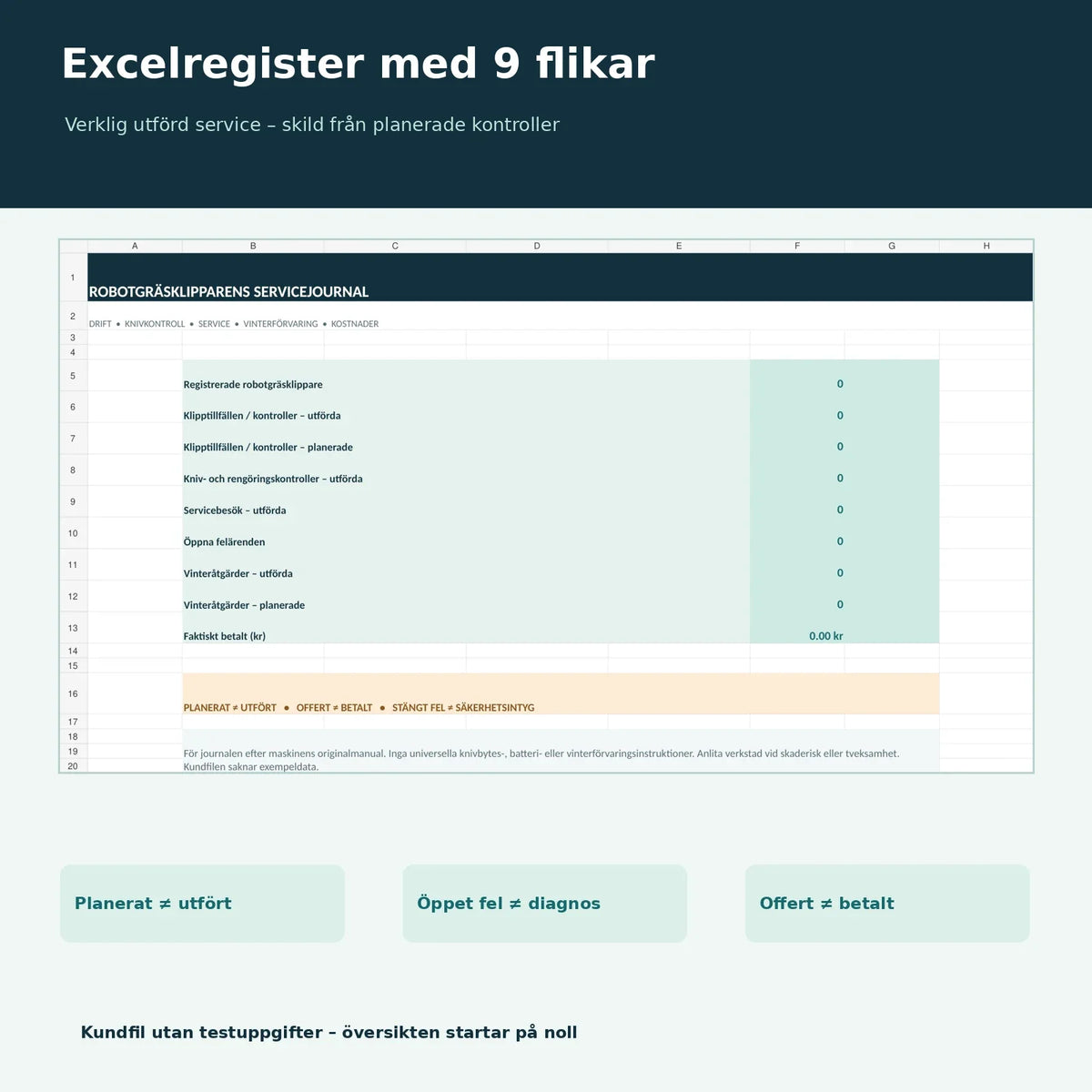
Five Swedish work templates, one Swedish user guide, and one English User Guide. All seven documents are included as editable Word files (DOCX) and searchable, print-friendly PDF files. In addition, an Excel record (XLSX) with nine tabs is included. Total of 15 files in a ZIP.
02. What the Files Contain
Machine card, seasonal start and mowing log, blade and cleaning checks, fault and service logs, as well as winter storage and cost log. Excel consolidates machines and actions with status fields distinguishing between planned, completed, and actually paid.
Documents in the Robotic Lawn Mower Service Log
| Template | Function | Format |
|---|---|---|
| 01. Machine card & installation profile | Manufacturer, model, serial number, warranty, responsible parties, and manual references | Swedish · DOCX/PDF |
| 02. Seasonal start & mowing log | Observations at the start of the mowing season and during operation | Swedish · DOCX/PDF |
| 03. Blade check & cleaning | Documentation of model-approved user checks and any parts | Swedish · DOCX/PDF |
| 04. Fault log & service | Fault codes, workshop contacts, actual service actions, and follow-up | Swedish · DOCX/PDF |
| 05. Winter storage & costs | End of season, winter storage according to the manual, and cost references | Swedish · DOCX/PDF |
| 06. Swedish user guide | Usage, status fields, safety boundaries, and sources | Swedish · DOCX/PDF |
| 07. English User Guide | Instructions for using the Swedish templates | English · DOCX/PDF |
| 08. Excel record | Nine tabs with formulas, overview, logs, and cost summary | Swedish · XLSX |
Excel record with nine tabs
The workbook contains Overview, Machines, Mowing Log, Blade Checks, Service, Faults, Winter Storage, Costs, and Read Me. The overview counts registered machines, completed and planned checks, actually performed service visits, open faults, and winter measures. Each record tab has space for 200 input rows.
The overview does not count planned items as completed. Only cost items with the status Actually paid are summed in the actual cost total; quotes are not included. The workbook has no automatic app connections, machine data, battery measurements, maintenance reminders, or electricity price calculations. The customer file is reset.
How to use the service log
- Create a machine ID and register the model, purchase date, and reference to the original manual.
- Enter your own observations about mowing results, fault codes, and visible status in the Mowing Log.
- Record only blade and cleaning checks that the manufacturer expressly allows you to perform.
- Document completed service visits based on the workshop's original report and save the reports.
- Record faults without diagnosing electrical or mechanical problems yourself.
- Collect the completed steps of winter storage and follow up on actually paid expenses with receipts.
Safety and winter storage
Manufacturers provide different instructions depending on the model. GARDENA's winter storage guide covers cleaning, blade checks, batteries, and storage. Husqvarna's winter guide describes preparation and professional seasonal service. Exact requirements vary between models. Always follow the manual and the manufacturer's safety routines; do not handle sharp blades, batteries, or electrical parts in an unsafe manner.
Frequently asked questions
Does the template work with Husqvarna, GARDENA, and other brands?
Yes, the fields are generally designed. For safety steps and intervals, follow the current machine's original manual.
Are there instructions for changing blades yourself?
No. You document checks and actually performed actions, but no universal disassembly or blade replacement instructions are included.
Can I register multiple robotic lawn mowers?
Yes, use your own Machine ID for each unit in Excel.
Does Excel automatically calculate when I should change the blades?
No. The manufacturer's maintenance instructions govern. Any next check dates are registered manually.
Are automatic fault notifications from the robotic lawn mower's app included?
No. Fault codes and events are entered manually. No connection to robotic lawn mowers or manufacturer accounts is included.
Are the PDF files digitally fillable?
They are searchable and print-friendly, but have no interactive form fields. Use Word for editable forms.
Is the package fully translated into English?
No. The work templates and Excel record are in Swedish, with a separate English user guide.
Related document templates
For general property service planning: The Villa Maintenance Plan & House Log. Also read about the Vacation Home Inspection Log and explore Templates for private individuals.
Version 1.0 · October 25, 2026. AI-assisted source control with official manufacturer instructions. No documented external technical review. Digital delivery in ZIP must be linked to the correct Shopify variant before publishing.