

Svenska Dokumentmallar
Fencing & Manual Gates – Asset Register, Inspection Rounds and Action Log | Word/PDF/Excel
Fencing & Manual Gates – Asset Register, Inspection Rounds and Action Log | Word/PDF/Excel
- File format
- DOCX, PDF, XLSX
- Document language
- Five Swedish work templates Swedish user guide and English User Guide for the Swedish documents
- Number of files
- 7
Digital download. No physical product is shipped.
Couldn't load pickup availability
About this template
Fences & Manual Pedestrian Gates – asset register, visual damage inspection and action log
Fences & Manual Pedestrian Gates – Asset Register, Visual Damage Inspection and Action Log is a professional digital document package for housing cooperatives, landlords, property owners and technical property managers who need to monitor standard fence sections and manual pedestrian gates. It provides separate documents for inventory, risk-free visual damage inspection, fault reporting, ordered service, work actually performed and subsequent re-inspection.
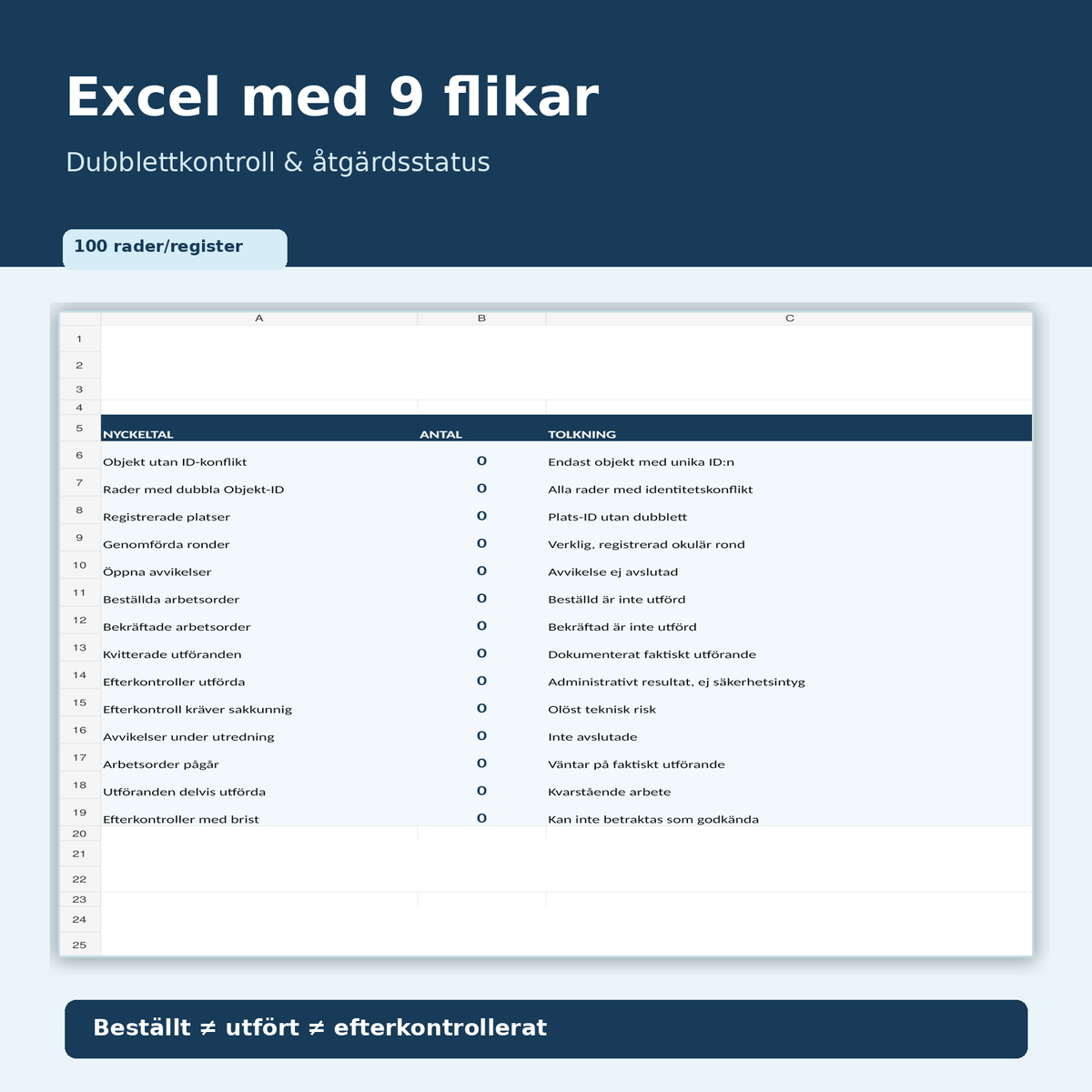
Short answer: You get five Swedish work templates and two guides as 7 editable DOCX and 7 searchable A4 PDFs. An Excel tool with nine tabs is included, meaning 15 customer files in a digital ZIP. The Swedish work templates are not translated in the package; the English User Guide is a separate English instruction for the Swedish documents. Version 1.0, Swedish law, reviewed November 6, 2026.
01. Package contents
Five Swedish work templates: 01 Fence and pedestrian gate register, 02 Visual damage inspection, 03 Fault reporting and temporary protective measure, 04 Service order for fences and manual gates, and 05 Completion certificate and re-inspection. Two guides: 06 Swedish user guide and 07 English User Guide. All of these are available in both Word and PDF. Excel: 08 Fence and pedestrian gate register with nine tabs, formulas and status lists. Total 7 DOCX + 7 PDF + 1 XLSX.
02. What the files contain
Work fields for property, Location ID, unique Asset ID, fence/gate type, material, observed post damage, visible fittings, pinch or cut risk, protective measures actually implemented, work orders, completion certificates and separate re-inspection. The included Excel workbook has duplicate checking, seven registers with 100 input rows each and 714 formula cells. Ordered ≠ performed ≠ re-inspected. A visual note is never a certificate of design, load-bearing capacity, building permit, or child safety.
Who needs a fence register and a gate log?
Housing cooperative: The cooperative's manual yard gate sticks after winter. The board documents the exact gate, visible damage and service needs without locking in residents' names or gate codes in the spreadsheet. Property manager: A fence post leans after a storm. The control inspector makes a risk-free observation, reports personal risk and lets the responsible party decide on cordoning off and expert service. Service provider: Ordered hinge replacement is reported back as actually performed, after which the customer performs a separate re-inspection and leaves any safety issues open.
Important area of use: These templates are intended for standard manual pedestrian gates and existing fences. They are not intended as a primary template for gate motors, road barriers, traffic closures, certified child protection, playground fences, fire protection, secret access codes, strength testing or building permit review. For special protection against falls, child intrusion or traffic, an individual competent technical assessment is required.
Exact file list – 15 files
| File | Content | Language | Format |
|---|---|---|---|
| 01 Fence and pedestrian gate register | Asset ID, location, material, intended function and responsible party | Swedish | DOCX + PDF |
| 02 Visual damage inspection | Visible posts, pickets, fittings, access and risk observation | Swedish | DOCX + PDF |
| 03 Fault reporting and protective measure | Actual fault, urgent escalation, protective measure taken | Swedish | DOCX + PDF |
| 04 Service order | Ordered repair, professional expertise, supporting documentation and due date | Swedish | DOCX + PDF |
| 05 Completion certificate and re-inspection | Work actually performed, remaining questions and subsequent check | Swedish | DOCX + PDF |
| 06 Swedish user guide | Seven work steps, five scenarios, official sources | Swedish | DOCX + PDF |
| 07 English User Guide | How to use the Swedish forms; no foreign-law advice | English | DOCX + PDF |
| 08 Excel tool | Nine tabs with registers, status selections and ID checking | Swedish | XLSX |
File format: The Word files are intended for editing in compatible word processors. The PDF files are searchable A4 print files without digital form fields. Excel requires an XLSX-compatible spreadsheet program with formulas and status selections. We have not tested all program versions and mobile devices.
Excel – nine tabs, 714 formulas and seven status lists
The tabs are named Overview, Assets, Locations, Rounds, Deviations, Work Orders, Completions, Re-inspections and Read Me. The seven register tabs each have 100 empty input rows. Duplicate Asset IDs are marked DUPLICATE; the overview counts only conflict-free Asset IDs. The status lists distinguish between planned and actual rounds, open deviations, ordered work orders, completed work, and separate re-inspections.
Verified functional test: A tested repetition of Asset ID ST-001 was marked as DUPLICATE on both rows, while a third unique ID was counted separately. Orders with status Ordered were not counted as completed, and a separate re-inspection was counted correctly. All test data has been cleared from the customer file; the delivered overview shows zero until actual data is registered.
Workflow – from inventory to actual re-inspection
- Check responsibility: Determine who owns the fence or gate, contractual boundaries and who is responsible for safe passage.
- Register assets: Give each fence section and manual pedestrian gate its own Asset ID and Location ID. Enter verified data about function and existing documents.
- Perform a safe visual inspection: Note visible damage, corrosion, loose or sharp parts and known obstacles. Do not attempt to force, pull on or load a suspected unsafe structure.
- Address actual risks: In case of urgent personal risk, the responsible party must immediately follow local safety and cordoning-off procedures. No Excel status can replace actual damage mitigation.
- Create a separate service order: Order the right action for the right asset. Request a competent assessment of fastenings, special safety features and any permit issues if necessary.
- Register actual completion: Document what the contractor actually did, when and with what supporting documentation, without interpreting an order confirmation as a completed repair.
- Perform a re-inspection: Document the visible result and leave technical, legal or child-safety-related uncertainty open until the responsible expert has assessed the issue.
Swedish rules on fences, screens, gates and safety
Building permit for fences and screens: Boverket's current guidance on fences, walls and screens states that standard fences normally do not require a building permit. Boverket's guidance on screens describes that screens may be subject to building permit requirements depending on classification, height, location and special exemptions. Since the law changes on December 1, 2025, there are special provisions in the Planning and Building Act (2010:900), Chapter 9, Section 19. Municipal detailed plans, proximity to boundaries, particularly valuable environments and other rules can affect permissibility. This inspection template does not provide a building permit decision or neighbor consent.
Safety on properties: Boverket's guidance on property requirements describes PBL Chapter 8, Section 9, including the suitability of properties and protection against accidents in situations where the provision is applicable. A manual pedestrian gate with an actual protective function, for example at a fall opening or where young children may be present, may require a special technical assessment. A visual inspection does not imply that a gate is child-safe.
Maintenance: PBL Chapter 8, Section 14 applies to the maintenance of buildings. Whether and how it applies to a specific fence structure must be assessed based on actual circumstances, and it does not provide a national fixed service interval for all fences. There is nothing in the package verifying a general statutory requirement for, for example, weekly gate checks.
Difference from other Mallbutiken products
Neighbor agreement for fences and hedges handles agreements, placement and cost allocation between neighbors. Road barriers & Gate automation focuses on barriers and automated gates. Balcony control & Railing log refers to balcony railings and fall risks. This package instead covers ongoing management logs for standard fences and manual pedestrian gates, without a neighbor agreement template or operation of motorized gates.
Frequently asked questions
Do I need to apply for a building permit for a standard fence?
Standard fences normally do not require a building permit. A solid or high screen may, however, be subject to permit requirements depending on classification, height, location and any exemptions. Check the actual conditions of your property with the building committee.
Does the template apply to an automatic gate?
No. Automatic gates and road barriers have different technical and safety needs and are not included in this product.
Can I approve a child safety gate by marking OK?
No. Excel and Word record administrative observations. A safety or child safety feature may require expert review and actual supporting documentation.
What do I do if a post leans or a gate risks coming loose?
Avoid test loading. Document safe observations and contact the responsible party for urgent protection and the correct technical assessment.
Is a service order the same as completed work?
No. The packages have separate documents and Excel registers for work orders, actual completion certificates and re-inspection.
Are there fillable PDF files?
The PDF versions are searchable A4 files for reading and printing, not PDF forms with digital fields. The included DOCX files are editable.
Are English work forms included?
No. Five work forms and a Swedish guide are in Swedish. A separate English User Guide shows how the Swedish forms should be used.
Version and review status
Version 1.0 · Sweden · November 6, 2026. The documents and the specified official legal sources have been AI-assisted reviewed. No independent external legal review, building permit review, structural inspection, child safety certification or guarantee of legal compliance is included. Product status is Shopify DRAFT. The ZIP delivery is separately verified in Google Drive; a Digital Products link may only occur after manual review and activation.