About this template
Notice of Hindrance & Extension of Time 2026/2027 – notification, request, and evidence register for construction contracts
Has a hindrance occurred in a construction project? With this self-produced document package, contractors, clients, and construction managers get structured templates for notice of hindrance, supplementary hindrance notification, documentation of time impact, request for extension of time, acknowledgement of receipt, and decision follow-up. Track the entire process with an Excel register where claimed days are kept separate from days that have been expressly approved.
15 files in one ZIP: 7 editable Word (DOCX) files, 7 searchable PDFs, and 1 Excel (XLSX) file with nine tabs and a dashboard. Five main Swedish templates, a Swedish user guide, and an English User Guide. Digital one-time delivery, without shipping or subscription fees.
AB 04 and ABT 06 are standard agreements from BKK, not laws. To invoke the rules, they must be incorporated into the specific contract and specific AF (Administrative Provisions) modifications must be considered. Hindrances and extension of time are addressed in, among others, Chapter 4, sections 3–4 of these standard agreements; compensation for client-side hindrances may be applicable under specific circumstances, such as in Chapter 5, section 4. It is always the wording and actual circumstances of the individual contract that govern. BKK stated in June 2026 that revised compensation agreements are expected no earlier than the latter part of 2027.
01. Package content
15 downloadable files – a total of eight different work documents and tools:
- 7 Word files (DOCX) – five main Swedish templates plus Swedish and English guides.
- 7 PDF files – corresponding searchable A4 documents for reference, printing, and documentation.
- 1 Excel workbook (XLSX) – nine tabs for registering hindrances, time claims, notifications, evidence, cost reservations, and decision status.
Language: Swedish main templates and a separate English User Guide; no English contract templates. Edition: 1.0, 2026/2027. Delivery: Digital ZIP.
02. What the files contain – document by document
| File | What the document contains | Format |
|---|---|---|
| 01. Notice of hindrance – initial notification | Project, contract, and authorized representative; observed hindrance, time of discovery, contract reference, preliminary time risk, and documented dispatch. | Word + PDF |
| 02. Supplementary hindrance notice | Original hindrance ID, new facts, updated hindrance period, changed forecast, recipient details, and supplementary documentation. | Word + PDF |
| 03. Report on time impact | Baseline/revised schedule, controlling activities, actual causal chain, parallel events, methodology, mitigation measures, and evidence. | Word + PDF |
| 04. Request for extension of time | Claimed days and correct unit, proposed new date, references to supporting documents, potential cost reservations, and formal recipient. | Word + PDF |
| 05. Acknowledgement & decision log | Receipt, counter-claims, need for supplementation, express decision, authorization, approved days, and distribution. | Word + PDF |
| 06. Swedish user guide | Eleven steps and checks: contract/AF, notification, evidence, time impact, finances, decisions, and Excel register. | Word + PDF |
| 07. English User Guide | English guidance on Swedish templates, claimed versus approved extension of time, and evidence. No English main templates. | Word + PDF |
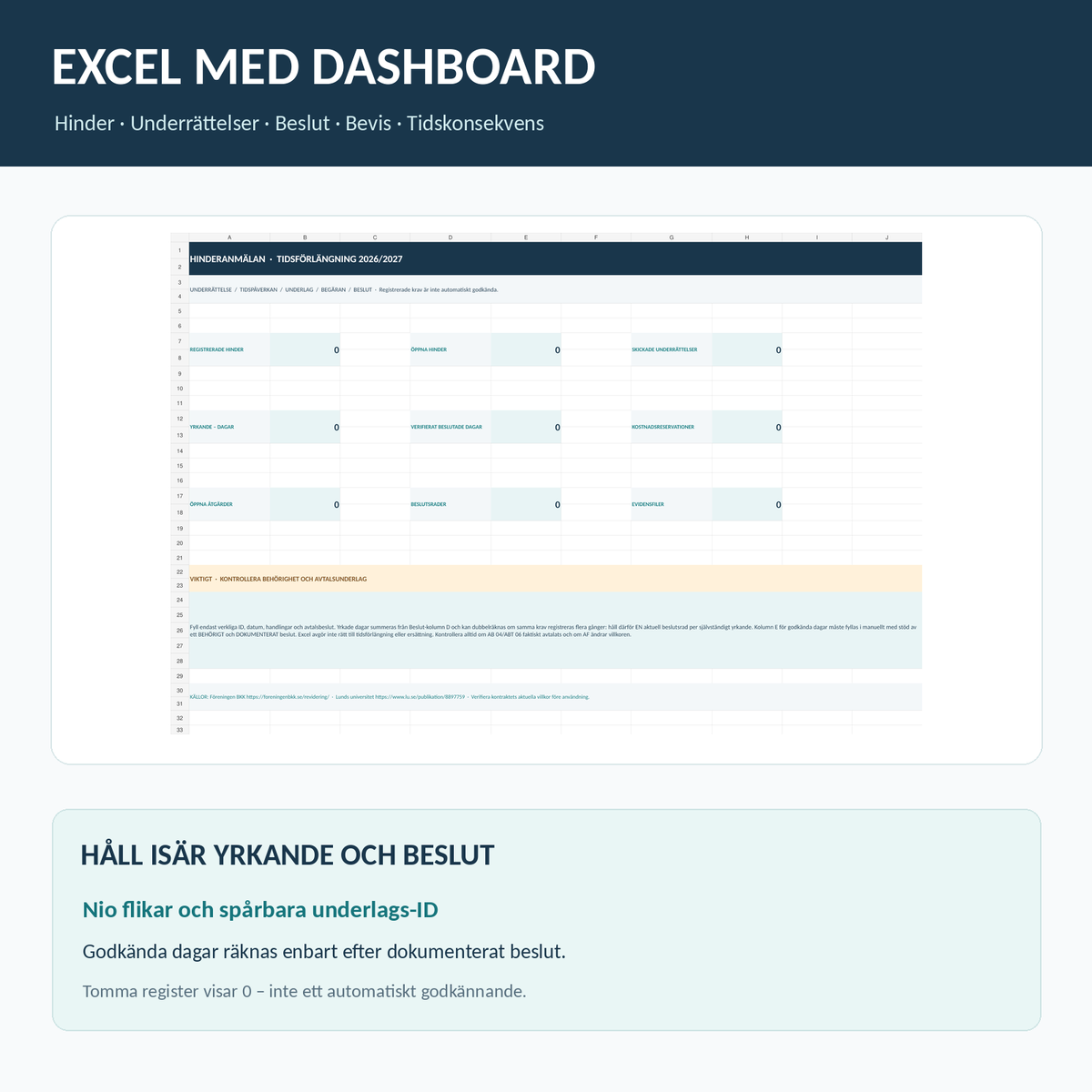
| 08. Excel – hindrance register with dashboard | Nine tabs: Overview, Hindrance, Notifications, Time Impact, Measures, Cost Reservation, Decision, Evidence, and Read Me. | Excel (XLSX) |
Total: 7 DOCX + 7 PDF + 1 XLSX = 15 delivery files. No real-world hindrances, decision dates, signatures, contract amounts, or approvals are pre-filled.
03. Excel with nine tabs and dashboard
Overview · Hindrance · Notifications · Time Impact · Measures · Cost Reservation · Decision · Evidence · Read Me.
The Excel tool tracks unique hindrance IDs, dispatch/receipt, actual schedule dates, recorded measures, cost reservations, and documented party decisions. The dashboard shows nine key metrics, including number of open hindrances, sent notifications, claimed days, and verified approved days in separate fields.
Important distinction: Days in a claim are not automatically counted as approved. Decision-based days are entered separately after a documented decision by an authorized party and are counted as approved only with such explicit status. Empty registers show zero. Keep one current decision row per independent claim to avoid double-counting.
How to use notice of hindrance – step by step
- Establish the ground rules. Check the signed contract, contract appendices, AF deviations, incorporation of the standard agreement, notification rules, correct recipient, and authorized representatives.
- Identify the hindrance and act early. Document when the hindrance was discovered, what happened, affected works, and preliminary time risk. Follow the applicable agreement regarding when the notification must be sent.
- Send the initial notification. Use file 01 for parties, date, description, contractual basis, and authorized recipient. Save emails, timestamps, proof of dispatch, and any confirmation of receipt.
- Supplement in case of change. Use file 02 with the same hindrance ID for new facts, impact, and attachments. Supplementation must be distinguishable from the initial notification.
- Investigate actual time impact. Use file 03 to show the link between the event and the project's activities, including baseline, revised schedule, alternative measures, and evidence.
- Request extension of time separately. Use file 04 for claimed days, calculation method, and proposed new date. A separate cost reservation may be needed; it does not in itself provide a right to compensation.
- Document receipt, decisions, and ongoing process. Use file 05 and Excel. Distinguish between confirmation of receipt, objections, need for further information, actual approval, and rejection. Archive the documentation. -->
AB 04, ABT 06 – what is legally important?
For commercial construction projects, AB 04 and ABT 06, if formally agreed upon, may contain rules regarding hindrances, notifications, and the right to an extension of time. The point in time when the hindrance became known, the contractual basis, the actual impact on the contract time, any formal requirements, applicable AF conditions, and the recipient of the notification must all be verified.
A notice of hindrance is not automatically a granted extension of time. A site diary, an updated Gantt chart, a comment in Excel, or a site meeting protocol may have evidentiary value but does not necessarily replace the contractually required notification or a necessary binding decision. Time and money are separate issues: not all hindrances entitle one to compensation for extra costs. Client-related hindrances may trigger compensation under specific conditions but must be evaluated in each individual case.
You are purchasing original document templates and registers, not a certificate of the right to an extension of time, a pre-approved notification, a legal opinion, or reproduced copyright-protected BKK terms. The package is primarily intended as administrative support for Swedish commercial construction. Check specifically if your contract is instead covered by, for example, the Consumer Services Act or specific special terms.
Supplementary templates for construction projects
- Construction Schedule & Production Planning 2026/2027 – master schedule, six-week plan, and Gantt. The hindrance log there is an operational record, not a complete hindrance notification.
- Site Meeting Protocol 2026/2027 – meeting documents, decisions, and follow-up.
- Additional Work (ÄTA) Form & Register 2026/2027 – separate changes and additional work linked to time and cost.
- Boundary Responsibility List 2026/2027 – document contract boundaries and the parties' agreed responsibilities.
Frequently asked questions about notice of hindrance
When should a notice of hindrance be sent?
As soon as required by the applicable agreement. Under standard terms like AB 04/ABT 06, notification without delay is critical, but always check the contract's full terms and any AF-deviations. Do not wait with a necessary notification just because the time impact cannot yet be calculated precisely.
Does a notice of hindrance automatically grant an extension of time?
No. Contractual basis, correct notification, actual hindering impact, and other terms must be assessed. A claim in Word or Excel is not an agreement.
Is the contractor entitled to compensation for all hindrances?
No. The right to any cost compensation requires a separate assessment of the grounds for the hindrance, the agreement, and the documentation. The cost reservation in this package is only for administrative support.
What do I do if the hindrance continues?
Use a supplementary notification and update the actual time impact report with the same hindrance ID. Follow the contract's notification rules and document new circumstances.
Is a completed schedule included?
No. This includes documentation regarding delays and time claims. For master schedules and Gantt charts, there is a separate product in Mallbutiken.se, linked above.
How does Excel calculate approved days?
Only manually entered approved days on decision rows where the status is explicitly "Approved per agreement" or "Partially approved per agreement." Claimed days are displayed separately.
Are the main templates in English?
No. Five main templates are in Swedish. A separate English User Guide is included in Word and PDF.
Sources and further reading
- Föreningen BKK – AB 04 and ABT 06.
- Föreningen BKK – revision of standard agreements and schedule.
- Lund University – thesis on hindrances, extension of time, and compensation according to AB 04.
Edition 1.0 · Source review October 14, 2026 · Swedish Document Templates / Mallbutiken.se · Self-produced general documents, no individual legal advice.