Svenska Dokumentmallar
Release Management and Deployment Plan – Checklist, GO/NO-GO and Excel | Word/PDF
Release Management and Deployment Plan – Checklist, GO/NO-GO and Excel | Word/PDF
- File format
- DOCX, PDF, XLSX
- Document language
- Swedish main templates and Swedish guide; English User Guide
- Number of files
- 7
Digital download. No physical product is shipped.
Couldn't load pickup availability
About this template
Release management and deployment plan for IT – a ready-made working document in Word, PDF and Excel. Structure a software release, control dependencies, document GO/NO-GO decisions, plan rollbacks and follow up on functionality after production deployment. For companies, IT managers, project managers and businesses introducing new system versions or changes to existing services.
Templates for planning and documentation – not an automated release platform. No scripts deploy systems, approve changes or perform rollbacks.
When is this template package suitable?
Use it when a release affects real users, services or integrations and it needs to be clear what needs to be done, who has the mandate, what tests are required, when the work should be stopped and how the status should be handed over to operations. The documentation can complement an existing incident management, DevOps or ITSM process.
01. Package contents
15 customer files in a ZIP: five separate Swedish working templates, a Swedish user guide and an English User Guide, each in editable Word (DOCX) as well as a corresponding searchable A4 PDF, plus an Excel workbook (XLSX) with nine tabs. The PDF files are not promised as interactive fillable forms.
02. What the files contain
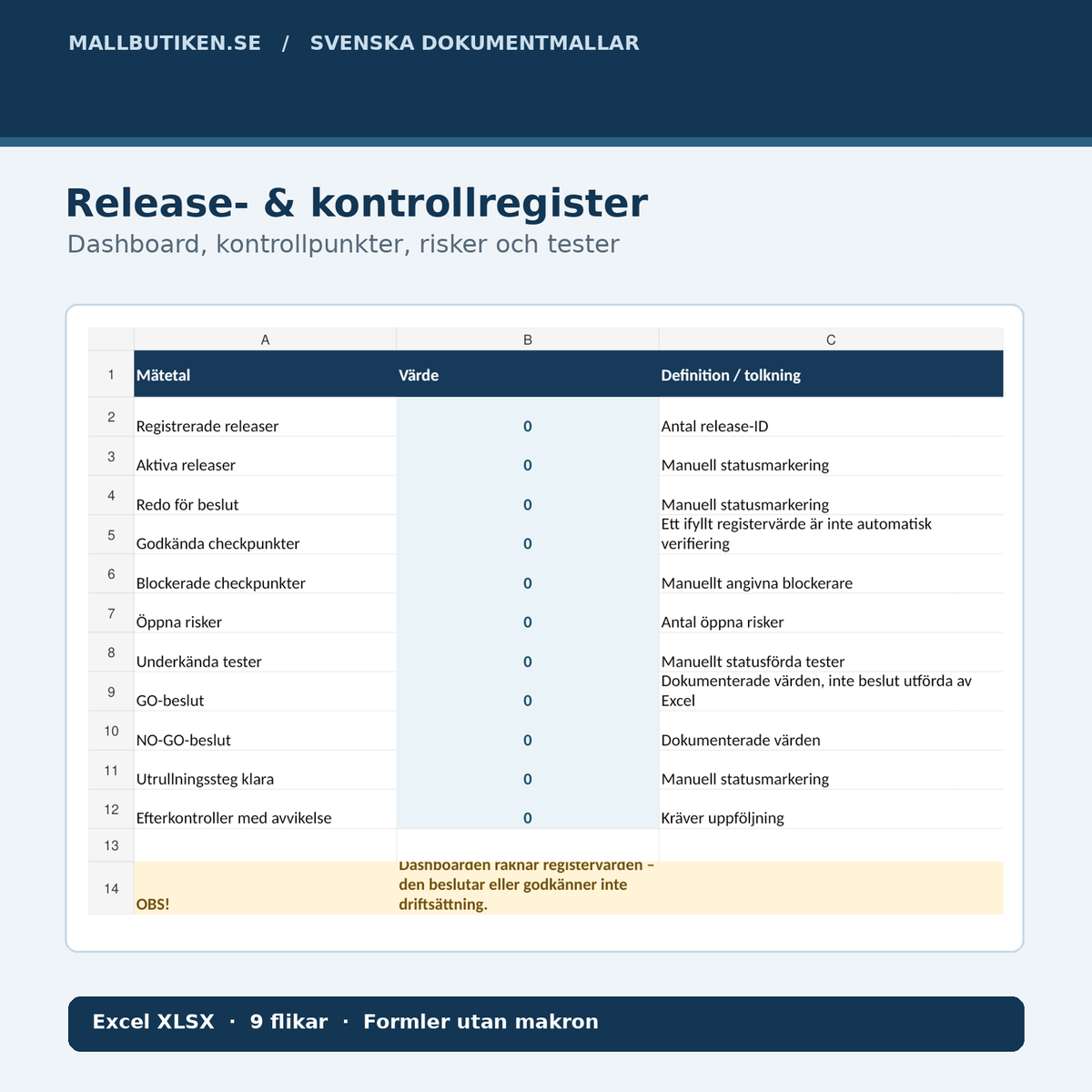
Release plan and deployment window, checklist, rollout and rollback plan, GO/NO-GO decision protocol, post-check with handover, as well as Swedish and English user guides. The Excel register collects releases, controls, risks, test results, decisions, rollout steps and post-checks in a summary dashboard.
File by file – concrete use cases
| Document | Function | Language | Format |
|---|---|---|---|
| 01 Release plan & scope | Release ID, version, deployment window, dependencies and responsibilities | Swedish | DOCX + searchable PDF |
| 02 Deployment checklist | Verification before, during and after implementation | Swedish | DOCX + searchable PDF |
| 03 Rollout & rollback plan | Implementation steps, stop rules and technical rollback references | Swedish | DOCX + searchable PDF |
| 04 GO/NO-GO – Decision protocol | Documented start decision, basis and conditions | Swedish | DOCX + searchable PDF |
| 05 Post-check & release protocol | Smoke test, stability check, deviations and operational handover | Swedish | DOCX + searchable PDF |
| 06 User guide | Step-by-step filling, controls and limitations | Swedish | DOCX + searchable PDF |
| 07 User Guide | Instructions for the Swedish templates | English | DOCX + searchable PDF |
| 08 Excel register | Nine tabs with release entries, tests, risks, decisions and dashboard | Swedish | XLSX |
Excel register with nine tabs and dashboard
Dashboard, Read me, Releases, Checklist, Risks, Tests, Decisions, Rollout and Post-check. The register tabs have clear columns for Release ID, responsibility, actual evidence and manual status markings. The dashboard counts registered releases, controls, blockers, open risks, failed tests, GO/NO-GO decisions, completed rollout steps and deviations after deployment.
Important: marking a status as “Approved” does not mean that Excel has tested the system. Decisions are made by an authorized person and actual evidence needs to exist outside the formulas. The workbook contains no macros and runs no code against the company's IT environment.
How to use the documents – step by step
- Identify release and scope. Enter version number, technical and organizational division of responsibility and planned deployment window.
- Review dependencies and risks. Check integrations, permissions, monitoring, backup requirements and technical rollback.
- Plan rollback. Document stop criteria, actual rollback method and who is authorized to decide to abort.
- Perform technical tests. Save actual test results, deviations and traceable evidence references.
- Make GO/NO-GO decision. Let an authorized person review the basis and remaining risks before production start.
- Implement and follow up. Log rollout steps, smoke test, alerts and post-checks and hand over to the operations manager.
Important legal and security limitations
Personal data: If the deployed service processes personal data, the data controller needs to assess current purposes, privacy-friendly default settings and technical and organizational security measures. This follows, among other things, from GDPR articles 5, 25 and 32 depending on the processing. Read IMY on data protection by design, IMY on information security and the full text of the data protection regulation.
Rollback: an administrative rollback plan does not prove that the system can be technically restored. There may be a significant risk of data loss or incompatible database versions. Rollback method and business impact should be tested separately.
Particularly regulated businesses: businesses covered by sector-specific security, reporting, archiving or contractual requirements need their own control points. The template package is not ISO, ITIL or NIS2 certification, not a complete legal compliance analysis and not a replacement document for any personal data incidents.
Frequently asked questions
What is a deployment plan?
A deployment plan describes how a specific system version or change should be introduced, who does what, what controls are required and how to abort if something goes wrong.
What does GO/NO-GO mean?
It is a documented decision to continue or abort a planned deployment. The decision should be based on actual evidence and made by an authorized person.
Can I perform an automated rollback with the files?
No. The rollout and rollback template helps you document a method. It does not execute commands, restore data or verify backup automatically.
Is an Excel-based release register included?
Yes. Nine tabs with status fields, references, risk prioritization and dashboard. Formulas summarize the data that the user has registered.
Can I fill in the Word templates myself?
Yes. The five main Swedish templates and guides can be edited in a compatible word processor. The PDF versions are searchable reading versions.
Are all templates translated into English?
No. The five main templates are Swedish; the separate English User Guide explains how the files are used and does not imply any legal adaptation to another country.
Can I use the templates for a SaaS or CRM release?
Yes, as organizational support, but complement with the specific tests, agreements, security routines and preparedness of the technical environment.
Complementary documents
For data migration and system change there is separate field mapping and reconciliation (the product is currently under preparation). If the IT delivery is to be approved against requirements, Acceptance Testing & IT Delivery Approval can complement the workflow. For internal requirements there is also Requirements Specification & Business Requirements (currently draft).
Product information and delivery
Product version 1.0, source control 29 October 2026, AI-assisted review of official sources. No external legal review or certification has been performed. Digital delivery with 15 files in ZIP when the seller has linked a digital file to the product and activated it. Product status before manual publication: draft.