Svenska Dokumentmallar
Data Migration Plan & System Cutover – Field Mapping, Go/No-Go & Excel | Word/PDF
Data Migration Plan & System Cutover – Field Mapping, Go/No-Go & Excel | Word/PDF
- File format
- DOCX, PDF, XLSX
- Document language
- Swedish main templates and Swedish guide; English User Guide
- Number of files
- 7
Digital download. No physical product is shipped.
Couldn't load pickup availability
About this template
Data migration plan and system change – a complete work support in Word, PDF and Excel. For Swedish companies that need to document a planned change of business system, customer register, CRM, member register or other digital system. The package helps with data mapping, field mapping, test runs, reconciliations and a documented decision on deployment.
The work material provides structure to the process, but is not a technical migration service, security certification, legal certificate or guarantee that data can be restored. A real migration must be performed and tested by appropriately responsible persons with current permissions and security routines.
When do you need a data migration plan?
During a system change, it is important to know which data sets should be included, how fields and identifiers are mapped, which errors stop the deployment and who makes the decisions. The templates are suitable for internal IT, project managers, data owners and outsourced technical providers who need common documents and traceable decisions.
01. Package contents
15 customer files in a ZIP: seven Word files (DOCX), the same seven documents as searchable PDF files and an Excel workbook (XLSX). Five main templates and two guides – Swedish and English. The Swedish main templates are editable; the PDF versions are primarily intended for printing and review and are not guaranteed to be interactively fillable.
02. What the files contain
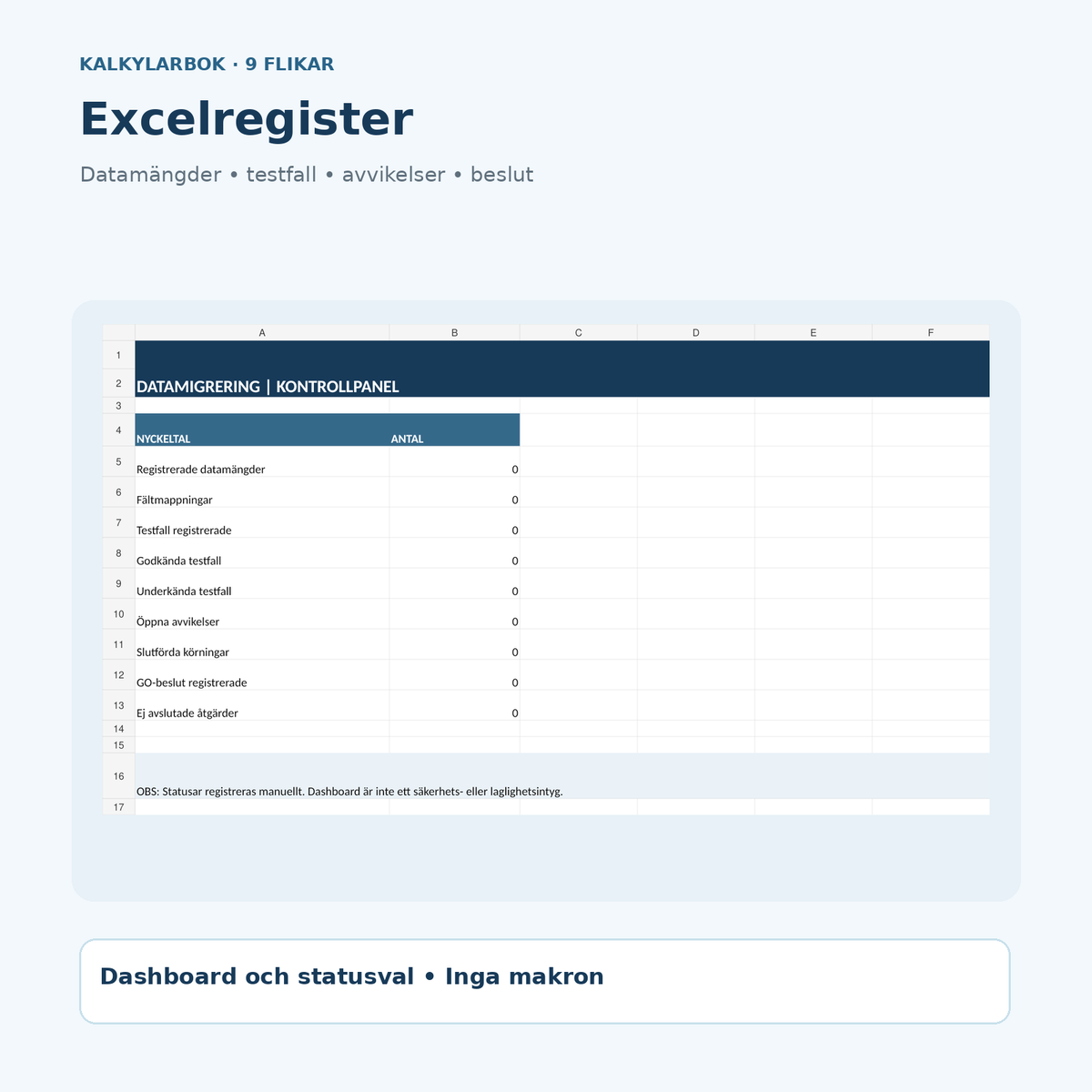
Migration plan, data mapping and field mapping, test plan for trial migration, reconciliation protocol for data quality, go/no-go decision with rollback plan as well as two user guides. The Excel register includes nine tabs for data sets, fields, test results, deviations, runs, decisions and actions.
All files and their function
| File | Use | Format | Language |
|---|---|---|---|
| Migration plan & system change | Scope, responsibility, schedule, boundaries and risk controls | DOCX + searchable PDF | Swedish |
| Data mapping & field mapping | Data sets, source/target fields, transformation rules and controls | DOCX + searchable PDF | Swedish |
| Test plan & trial migration | Expected outcomes, trial run, deviations and retesting | DOCX + searchable PDF | Swedish |
| Reconciliation protocol & data quality | Quantity control, keys, differences and decided tolerance | DOCX + searchable PDF | Swedish |
| Go/No-Go & rollback plan | Stopping criteria, decision mandate, rollback and follow-up | DOCX + searchable PDF | Swedish |
| User guide SV | Work order, practical controls and legal boundaries | DOCX + searchable PDF | Swedish |
| User Guide EN | English instructions for the Swedish templates | DOCX + searchable PDF | English |
| Migration register in Excel | Nine tabs with register, status options and dashboard | XLSX | Swedish |
Excel register for data migration – nine tabs
Dashboard, Read me, Data sets, Field mapping, Test cases, Deviations, Run log, Decisions and Actions. Use stable DATA-, MAP-, TEST- and RUN-IDs and enter actual information for each migration step. The register tabs have relevant manual status options. The dashboard counts the number of items, test results, open deviations and marked decisions. It does not run technical migrations and does not automatically approve a deployment.
How to use the document package
- Define the data boundaries. Identify source systems, target platform, information owners, necessary data types and what should not be transferred.
- Plan and determine responsibility. Specify time window, prerequisites, permissions, backup, restoration test and responsible decision makers.
- Map fields. Document source fields, target fields, types, data conversions, rules for duplicates and key references.
- Test in a test environment. Work with approved test tasks, measure actual deviation and document retesting.
- Decide GO/NO-GO. Test blocking errors, technical restoration and results before production start.
- Reconcile after run. Check items, key values, integrations and logs as well as document actions.
Data protection, security and important limitations
Personal data: When migrating personal data, principles of purpose limitation, data minimization, accuracy and storage minimization apply. Review which data needs to be transferred at all and how access is protected. Read IMY's guidance on GDPR's basic principles.
Data protection and security by design: GDPR articles 25 and 32 may require risk-adapted measures, access control, appropriate tests and measures for confidentiality, integrity and availability. See IMY on data protection by design and GDPR's full regulation text.
Impact assessment: If the processing of personal data is likely to lead to a high risk, a data protection impact assessment under GDPR article 35 may be required before the processing begins. See IMY's guidance on the timing of impact assessment.
Agreements and special requirements: Personal data processing agreements, third-country transfers, retention rules, contract terms or public activities may require separate documents and assessments. The document package does not replace these.
Frequently asked questions about the templates
Is this a ready-made solution for automatic data migration?
No. The Word and Excel files document planning, controls, decisions and follow-up. They do not move data between systems.
Can I use the templates when changing CRM or financial systems?
Yes, as an administrative basis. Adjust the controls according to data types, integrations, technical architecture, confidentiality and applicable law and contract requirements.
Is there a plan to revert to the old system included?
Yes. The Go/No-Go document has a section for rollback plan, stopping criteria and decision mandate. However, a real restoration method must be built and tested separately.
Can Excel show how many test cases have been approved?
Yes. The dashboard summarizes manual status markings in the test register. A registered status does not mean that technical tests have actually been performed.
Can I use real customer data in the templates?
Avoid raw personal data or sensitive data in work documents unless they are necessary, permitted and properly protected. Primarily use ID, roles and de-identified information for documentation.
Are all documents in English?
No. The main templates and Swedish guide are in Swedish. English User Guide is a separate English-language instruction for the Swedish main templates.
Are the documents GDPR-approved or certified?
No. There is no general such product approval. Every organization is responsible for its real system change and its applicable obligations.
Related documents for IT and process work
For defining boundaries, Process Mapping & Process Description can help. To plan separate backup and restoration test, there is Backup Plan & Restoration Test. For formal IT delivery, Acceptance Testing & IT Delivery Approval can be used as a complementary basis.
Format, delivery and review
Product version 1.0. AI-assisted source control of public data protection sources October 29, 2026. No external legal review, certification or actual system migration has been performed. Document format: 7 DOCX, 7 searchable PDF and 1 XLSX. Digital ZIP is delivered after the store has linked the digital file and activated the product. The product is under preparation.