Svenska Dokumentmallar
IT Problem Management & Known Errors (KEDB) – Problem Report, Workaround, and Excel | Word/PDF/Excel
IT Problem Management & Known Errors (KEDB) – Problem Report, Workaround, and Excel | Word/PDF/Excel
- File format
- DOCX, PDF, XLSX
- Document language
- Swedish working documents and Swedish guide; English User Guide
- Number of files
- 7
Digital download. No physical product is shipped.
Couldn't load pickup availability
About this template
IT Problem Management & Known Error Database (KEDB) is a digital document package for IT operations, service desk, and system administration. Gain structure for recurring incidents, document potential root causes, publish controlled instructions for temporary workarounds, and track permanent actions. You get 15 customer files in editable Word (DOCX), searchable PDF, and Excel (XLSX). Delivered as a digital ZIP file.
01. Package Contents
Five Swedish working documents, one Swedish user guide, and one English user guide in both Word and PDF, plus an Excel workbook. Total 7 DOCX + 7 PDF + 1 XLSX. The working documents are in Swedish; the English User Guide explains them in English but does not include English versions of the main templates. Version 1.0, October 29, 2026.
02. What the Files Contain
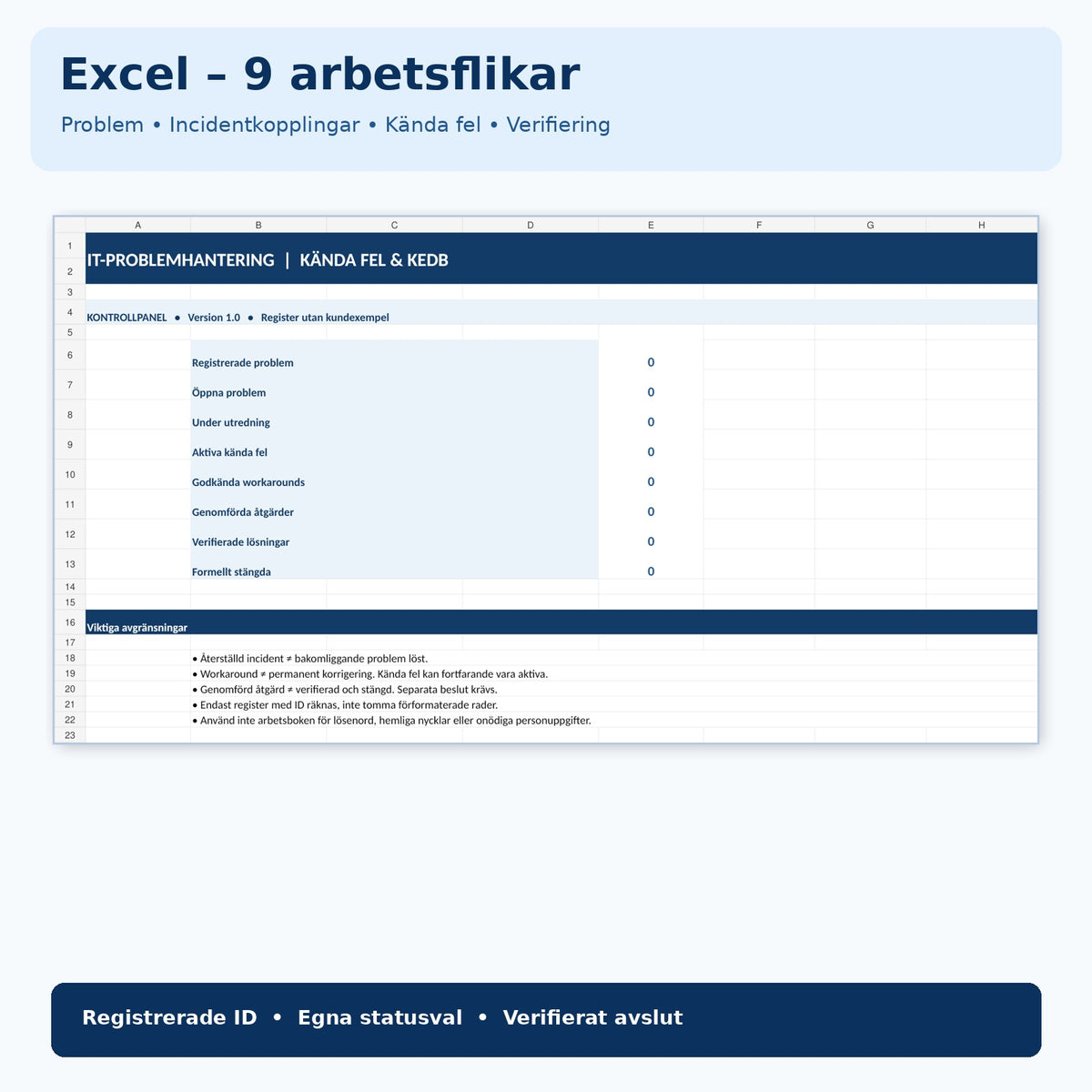
Problem registration, verifiable cause hypothesis, known error post (Known Error), temporary workaround with risks and validity, permanent action, and impact and closure control. The Excel register has nine tabs for problems, incident links, hypotheses, known errors, workarounds, actions, and verification. The overview uses unique IDs and separate statuses to avoid confusing a completed action with a verified solution.
What is IT problem management and a KEDB register?
IT problem management is about finding, documenting, and reducing the causes of one or more incidents. An incident may be restored without the root cause being eliminated. A KEDB register (Known Error Database) collects analyzed problems and documented temporary workarounds so that IT support can handle known symptoms in a controlled manner. The templates are used manually and are not an automated ITSM platform.
What do you get in the package?
| No. | Document | Content | Format |
|---|---|---|---|
| 1 | Problem Report / Problem Registration | Problem ID, link to incidents, symptoms, consequences, priority, and plan. | DOCX + PDF |
| 2 | Root Cause Analysis and Hypothesis Testing | Hypotheses, supporting and contradicting evidence, controlled tests, and decisions. | DOCX + PDF |
| 3 | Known Error – KEDB Entry | Known error ID, symptoms, cause basis, target audience, status, and review. | DOCX + PDF |
| 4 | Temporary Workaround | Prerequisites, approval, steps, risks, stop signals, and validity. | DOCX + PDF |
| 5 | Permanent Solution and Post-Implementation Review | Change reference, acceptance criteria, verified outcomes, and formal closure. | DOCX + PDF |
| 6 | Swedish User Guide | Workflow, concepts, risk boundaries, and links to methodology sources. | DOCX + PDF |
| 7 | English User Guide | English instructions for the Swedish working documents. | DOCX + PDF |
| 8 | Excel Register / KEDB | Nine tabs: overview, problems, incident links, hypotheses, known errors, workarounds, actions, verification, and Read Me. | XLSX |
The Excel Tool – Document, Track, and Maintain Control
The overview distinguishes between registered problems, open and ongoing investigations, active known errors, approved workarounds, completed actions, verified solutions, and formally closed cases. Rows without a registered ID should not be counted. The workbook contains pre-formatted register rows and status lists. Important: status fields and formulas cannot determine on their own whether risks are acceptable, causes are substantiated, or a case may be closed. Check the recalculation of the formulas in your spreadsheet application after entering data.
How to Use the Template Package
- Register a unique Problem ID and link related incidents without unnecessary personal data.
- Describe observed symptoms and actual business impact.
- Test alternative cause hypotheses with reliable and approved tests.
- Document a known error when the investigation basis justifies it.
- Describe any temporary workaround with its risk, authorization, and validity.
- Manage permanent correction through the organization's regular change process.
- Verify the result and have an authorized decision-maker document closure or continued monitoring.
Difference from Other Templates
To implement a concrete change with authorization, testing, and rollback, you can use IT Change Request & Change Management. For a broader method for quality investigation, there is 8D Report & Root Cause Analysis. This package is more specific to the IT problem lifecycle and knowledge articles about known errors.
Frequently Asked Questions
What does KEDB mean?
KEDB stands for Known Error Database, a register of documented known errors with symptoms, conditions, temporary workarounds, and references to actions. The product's Excel workbook is a simple register, not a complete ITSM application.
What is the difference between an incident and a problem?
Incident management often focuses on quickly restoring a service. Problem management focuses on underlying causes and reducing the risk of the same incident recurring. A restored incident therefore does not automatically mean the problem has been addressed.
What is a workaround?
A temporary solution that limits impact but does not necessarily address the root cause. It should have clear prerequisites, an owner, risk control, validity, and regular review.
Is the template an ITIL-certified solution?
No. The templates are independently designed working tools with methodological support from publicly available ITIL-related guidance. They have not been reviewed or certified by PeopleCert.
Does Excel automatically handle approval and case closure?
No. Excel has summaries and status fields but does not perform a technical check of a change. Actual verification and decisions on closure must be made according to the organization's authorization order.
Are the PDF files interactive forms?
No. They are searchable and printable. Use the Word files for editing and Excel for register management.
Can the package replace statutory incident reporting?
No. Organizations with special requirements under, for example, cybersecurity legislation or other sector regulations must follow their own reporting and information security requirements. The templates are voluntary internal working tools.
Sources and Quality
Methodology sources: PeopleCert – ITIL 4 Problem Management and Atlassian – ITIL problem management process. The sources do not imply a recommendation or approval of the product. AI-assisted methodology review on October 29, 2026; no external specialist or legal review has been conducted.