Svenska Dokumentmallar
Supplier Onboarding & Certificate Verification B2B 2026/2027 – F-tax, registration certificate & Excel | Word/PDF
Supplier Onboarding & Certificate Verification B2B 2026/2027 – F-tax, registration certificate & Excel | Word/PDF
- File format
- DOCX, PDF, XLSX
- Document language
- Five Swedish working documents Swedish User Guide and English User Guide
- Number of files
- 7
Digital download. No physical product is shipped.
Couldn't load pickup availability
About this template
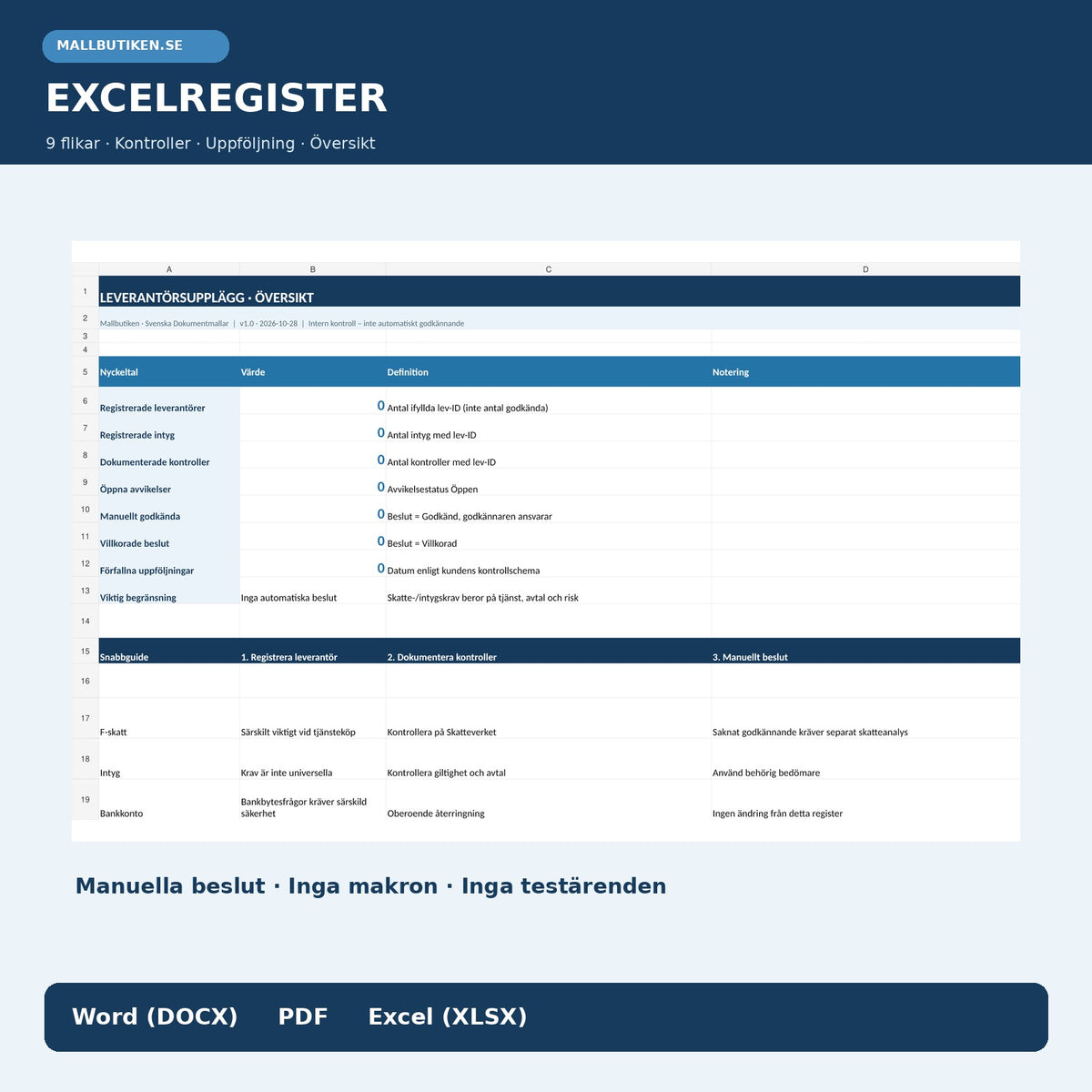
Supplier Onboarding & Certificate Verification B2B 2026/2027 is a professional document package for businesses that need to onboard a new supplier and document what company information, F-tax status, VAT registration, or contract-specific certificate has actually been checked. You get five Swedish working templates, two user guides, and an Excel register with nine tabs.
Delivered as a digital download: 7 editable Word documents (DOCX), 7 searchable PDF files, and 1 Excel workbook (XLSX). A total of 15 customer files in a ZIP package. 79 SEK as a one-time purchase – no physical delivery and no subscription. Version 1.0, 28 October 2026.
The product is intended for Swedish businesses that hire suppliers. It complements existing templates for supplier assessment, supplier agreements, and checks of changed bank details.
01. Package Contents
Five Swedish working templates for basic details, certificate request, check, approval decision, and review, together with a Swedish user guide and English User Guide. All seven are available in Word (DOCX) and searchable PDF. An Excel workbook with nine tabs is included. 15 files in total.
02. What the Files Contain
Editable forms with fields for supplier ID, company name, organization number, authority source, check result, deviation, document ID, validity date, decision-maker, and conditions. Excel provides a register, follow-up indicators, and status – not automatic supplier approval or system activation.
Complete Document List
| File / Template | Content | Format / Language |
|---|---|---|
| Supplier Onboarding – Basic Details | Company identity, delivery area, check sources, and responsible buyer | Swedish · DOCX + PDF |
| Request for Supplier Documents | Request relevant certificates according to contract, assignment, and risk | Swedish · DOCX + PDF |
| Certificate and Register Check | Document source, verification date, validity, and deviation | Swedish · DOCX + PDF |
| Supplier Decision and Activation | Separate authorized decision, conditions, restrictions, and system reference | Swedish · DOCX + PDF |
| Review and Deviation Follow-up | Follow-up date, missing documents, and checked actions | Swedish · DOCX + PDF |
| User Guide – Swedish | Workflow, check sources, exceptions, and limitations | Swedish · DOCX + PDF |
| English User Guide | English usage instructions for the Swedish working templates | English · DOCX + PDF |
| Supplier Register in Excel | Nine tabs for suppliers, certificates, checks, decisions, and follow-up | Swedish · XLSX |
Excel Register – Nine Useful Tabs
Overview: counts registered suppliers, certificates, checks, open deviations, conditional versus approved manual decisions, and expired follow-ups.
Suppliers: supplier ID, company, organization number, country, responsible buyer, and scope of assignment.
Certificates: type of document or registration status, issuer, check source, manual check result, and validity period. An expired end date is flagged as Expired – review.
Checks: source, result, and handler. An empty source reference gives Not clear; an entry marked as a deviation gives STOP – investigate. Even a documented check requires separate approval.
Deviations, Decisions, and Follow-up: open cases, individual action owners, authorized manual decisions, and follow-up times.
Sources and Read Me: official links, practical instructions, and clear legal limitations.
The workbook contains no macros, ERP system connections, payment functions, or fictitious supplier details. You fill in your own data. It performs administrative documentation and simple checks but no automatic tax, legal, or security assessment.
How to Use the Supplier Templates
- Create a supplier case. Enter the registered company, organization number, assignment, responsible buyer, and preferred contact method. Use a consistent supplier ID.
- Check official company details. Use the Swedish Tax Agency's service to check approval for F-tax, VAT, and employer registration, and the Swedish Companies Registration Office's company information for the registered company or other relevant details. Note the source and date.
- Assess the document requirements for the assignment. Specify insurance certificates, authorization, or industry certificates only where justified by the contract, risk, or applicable regulations.
- Request additional information. Use the template for a written request specifying the missing document, a practical deadline, and a secure response channel.
- Record the check result. Enter what has actually been verified and document any contradiction, deviation, or expired validity period.
- Make a manual decision. An internally authorized person makes a decision on approval, conditional decision, deferral, or rejection. A form or Excel status never automatically activates a supplier.
- Plan recurring review. Follow up on documents based on the assignment, contract, and risk, not based on a general, invented legal requirement for annual checks.
F-Tax and Supplier Checks – What Is Important?
The Swedish Tax Agency's Get company information service shows, among other things, whether a Swedish company is approved for F-tax as well as whether it is registered for VAT and as an employer. When purchasing services or work, F-tax is particularly relevant. If the contractor does not have approval, it may affect the buyer's obligation to make tax deductions and, depending on the company type and circumstances, pay employer contributions. This does not mean that all purchases from companies without F-tax are generally prohibited.
Verksamt provides guidance on vetting the party you do business with and, if necessary, checking company details, representatives, and special professional qualifications. The Swedish Companies Registration Office's information may be a relevant check source, but neither a registration certificate nor a submitted certificate guarantees a supplier's suitability or approves changed bank details.
Insurance certificates, environmental certificates, and certifications should be requested when there is a substantive basis according to the contract, industry, permit requirements, or documented risk. They are not general legal requirements for all suppliers.
For contact persons and other personal data, the principles of GDPR apply, including data minimization, accuracy, security, and storage minimization. Do not collect personal identity numbers, private contact details, or documents without a documented need and legal basis.
Frequently Asked Questions (FAQ)
What Is Supplier Onboarding?
Supplier onboarding is an internal process to identify a new supplier, document relevant checks, and make an authorized decision on registration in the organization's system. The template package provides a clear workflow and traceable documentation.
Must All Suppliers Have F-Tax?
Not as a general requirement for every type of purchase. F-tax is particularly important when purchasing work or services. The party purchasing the work may need to handle tax deductions and employer contributions depending on the supplier's status and company form. Check the situation with the Swedish Tax Agency.
Do We Always Need to Require Liability Insurance?
No. An insurance certificate may be important or a requirement in a specific contract or regulated assignment, but it is not a general legal requirement for all suppliers. Therefore, specify individually which certificate is requested and why.
Can Excel Automatically Approve a Supplier?
No. Excel displays administrative indicators, open deviations, and manually registered decisions. The supplier must be assessed and approved by the right person according to your internal authorities before activation in the ERP system.
How Do We Handle Changed Bank Details?
Changes to bank accounts should be handled according to a separate security routine, for example by independently calling back via previously verified contact channels. Neither a new supplier entry nor an approved certificate means that payment details are verified.
Are the Documents Included in English?
You get five Swedish working templates, one Swedish user guide, and a separate English User Guide. The English guide is a user manual; the working templates are not fully translated into English.
What File Formats Do I Get?
Seven editable DOCX files, seven searchable PDF files, and one editable Excel register (XLSX). The PDF files are documents for reading and printing, not interactive fillable forms.
Related Products in the Template Store
For broader risk assessment and recurring supplier follow-up: Supplier Assessment & Supplier Follow-up. For contracts and terms: Supplier Agreement / Supplier Agreement. For the secure handling of a new payment account, there is a separate Bank Detail Change & Verification (separate product, may be unpublished).
Official Sources and Review
Sources for internal fact-checking 28 October 2026: Swedish Tax Agency – Get company information; Verksamt – Hire a reputable supplier; Swedish Companies Registration Office – Search company information; IMY – GDPR's basic principles. The package has undergone internal AI-assisted source and functionality checks, not external legal, audit, or banking review. The templates are voluntary administrative aids and must be adapted to contracts, business operations, and actual legal rules.