Svenska Dokumentmallar
Terminal Glasses – eye examination, requisition and employer decision | Word/PDF/Excel
Terminal Glasses – eye examination, requisition and employer decision | Word/PDF/Excel
- File format
- DOCX, PDF, XLSX
- Document language
- 7 Swedish work templates + 1 Swedish guide + 1 English User Guide. Excel in Swedish.
- Number of files
- 9
Digital download. No physical product is shipped.
Couldn't load pickup availability
About this template
Terminal glasses – eye examination, optician referral and employer decision
For employers, HR and occupational health and safety managers who want to document the entire process for computer glasses: from checking visual requirements and offering an examination to optician referral, cost decision and follow-up. An editable template package in Word, PDF and Excel, adapted as administrative support according to Swedish occupational health and safety law.
Quick facts: Seven Swedish work templates, one Swedish user guide, one English User Guide and one Excel register with ten tabs. Digital download as a ZIP. No eye examination, optician service or individual medical assessment is included.
Package contents
Seven work templates for local policy, assessment of computer work, offer of eye examination, optician referral, administrative statement of need, cost decision and delivery/follow-up. Two guides and one Excel register link the workflow together with a common case ID.
What the files contain
20 customer files: nine editable DOCX, nine corresponding searchable but static PDFs, one XLSX with ten tabs and a README. The work templates and Excel register are in Swedish. The English file is a user guide, not an English version of the Swedish work templates. The PDF files are not digitally fillable.
Who is the package suitable for?
For small and medium-sized enterprises, public sector organizations, offices, HR and occupational health and safety managers who administer eye examinations for computer and screen work. Those seeking a general ergonomic risk assessment can instead use Occupational ergonomics – risk assessment. This package focuses specifically on the referral and decision-making process for occupational glasses.
File by file – document and function
| Work file | What it is used for | Language and format |
|---|---|---|
| 01 Policy and local routine | Establish offer, responsibility, purchasing and information management | Swedish · DOCX/PDF |
| 02 Visual requirements and work tasks | Assess normal computer work, working distances and work environment | Swedish · DOCX/PDF |
| 03 Offer and receipt | Document that an eye examination has been offered | Swedish · DOCX/PDF |
| 04 Optician referral | Order examination and state the visual requirements of the work task | Swedish · DOCX/PDF |
| 05 Administrative statement of need | Document only the necessary statement from a qualified examiner | Swedish · DOCX/PDF |
| 06 Cost decision and order | Distinguish necessary costs from optional add-ons | Swedish · DOCX/PDF |
| 07 Delivery and follow-up | Follow the delivery and usability of the work equipment | Swedish · DOCX/PDF |
| 08 User guide | Workflow, common questions, normal and exceptional examples | Swedish · DOCX/PDF |
| 09 User Guide | English instructions for the Swedish templates | English · DOCX/PDF |
| 10 Case register | Overview, offers, referrals, orders, costs and follow-up | Swedish · XLSX, ten tabs |
| README | Contents, limitations and official sources | Swedish · TXT |
How the Excel register is used
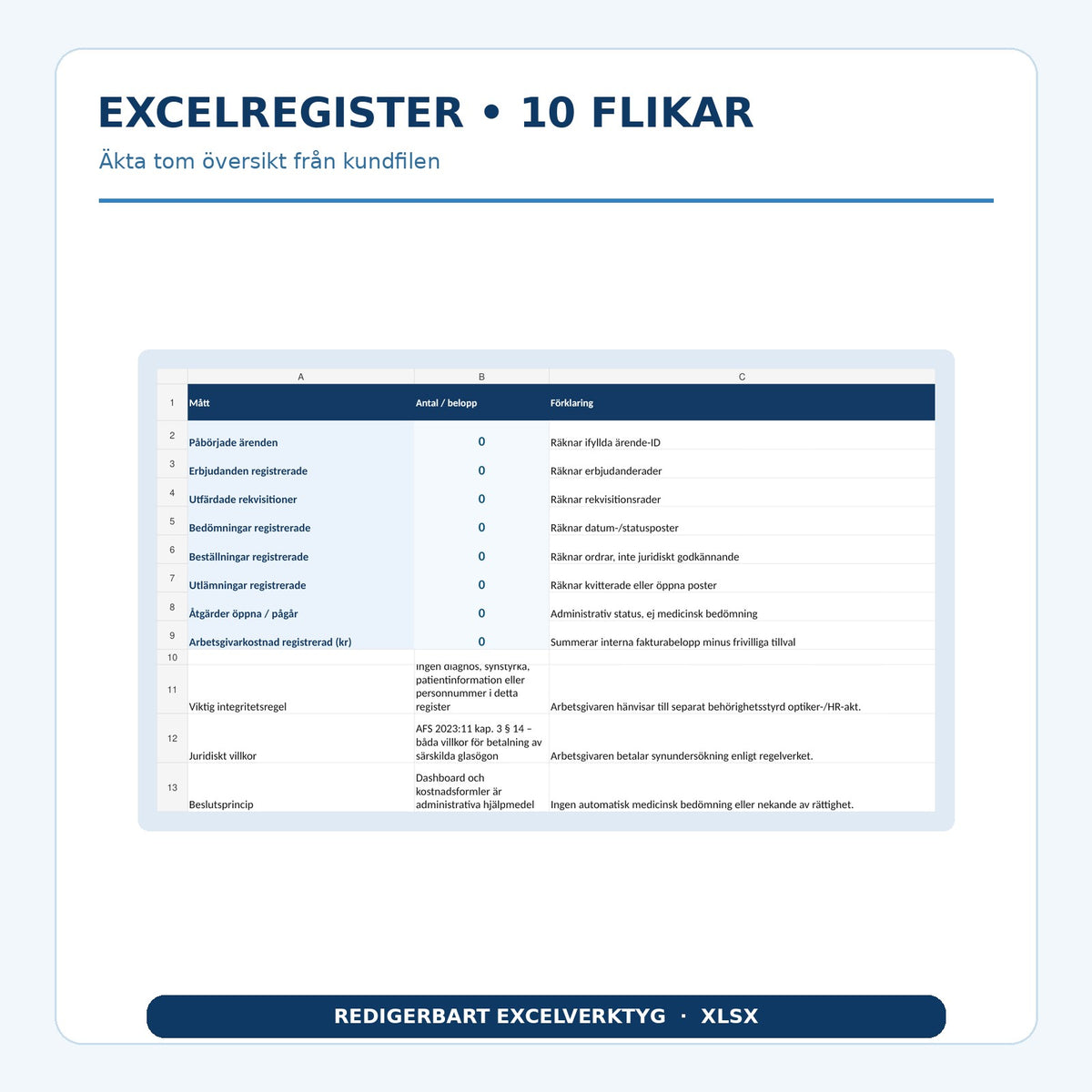
Record an internal pseudonymous case ID and follow the same reference from offer to delivery and follow-up. Excel counts the number of cases, administrative steps, open actions and recorded employer costs. No need for glasses is automatically approved. Do not enter names, personal identity numbers, visual values, diagnoses or prescriptions in the register. Such information should properly belong in the organization's authorization-controlled system.
Practical workflow
- Check the employee's normal computer work and what visual requirements the work actually entails.
- Offer an examination according to applicable requirements and document the offer.
- Issue a referral with relevant working distances and information about the work task.
- Receive only the necessary administrative statement from a qualified examiner.
- Assess and document the employer's cost responsibility. Distinguish necessary glasses from optional add-ons.
- Document delivery, follow-up and any new needs.
Legal requirements and limitations
According to AFS 2023:11, Chapter 3, Section 14, employees who normally work at a computer for more than one hour during the working day shall be offered an eye examination. The employer shall pay for the examination and special glasses when the examination shows that these are needed for computer work and glasses for normal use do not work. A previous examination with another employer may affect whether a new examination is needed. The Swedish Work Environment Authority's guidance on eye examinations also describes recurring examinations and costs.
According to the Swedish Tax Agency's guidance on work equipment, necessary terminal glasses may be a tax-free benefit. The template does not determine medical need, establish an automatic right to compensation, or be used to circumvent the employer's obligations.
Frequently asked questions
When should the employer offer an eye examination?
When the employee normally works at a computer for more than one hour during the working day. Regular follow-up and special needs must also be considered.
Who pays for the terminal glasses?
The employer shall pay when a qualified eye examination shows that special computer glasses are needed and that regular glasses do not work for the work task.
Is the optician examination included?
No, the package consists of administrative Word, PDF and Excel documents. The eye examination and medical statement of need are carried out separately by a qualified examiner.
Can an employer set a fixed cap for all glasses?
A local frame policy and optional add-ons must be distinguished from necessary corrective lenses. The employer may not use an arbitrary general price cap to avoid legally necessary costs.
Are all documents available in English?
No. The work templates and Excel are in Swedish. A separate English User Guide with instructions is included.
Can the form be used for all medical information?
No. The register is intentionally administrative and should not store diagnoses, prescriptions, visual values or personal identity numbers.
Version 1.0. Official sources checked November 21, 2026. AI-assisted source checking, no external legal or optician approval. The employer is responsible for filling in, adapting and establishing the documents according to their actual operations.