Svenska Dokumentmallar
Switching accounting software – SIE export, balance check and archiving certificate | Word/PDF/Excel
Switching accounting software – SIE export, balance check and archiving certificate | Word/PDF/Excel
- File format
- DOCX, PDF, XLSX
- Document language
- Five Swedish operational workbooks in DOCX/PDF Swedish user guide in DOCX/PDF separate English User Guide in DOCX/PDF. Swedish Excel workbook; no full English version of the workbooks.
- Number of files
- 7
Digital download. No physical product is shipped.
Couldn't load pickup availability
About this template
Is your company changing accounting software? This documentation product helps finance and systems personnel document SIE exports, check balances, and perform sample verification checks, while ensuring continued access to historical accounting information. For Swedish businesses changing accounting systems, not for setting up accounting or performing the data migration itself. Important: an imported SIE file does not prove that the accounting is complete or accurate.
Quick facts: Sweden; 5 operational working documents in Swedish, plus a Swedish guide and an English User Guide. Seven editable Word files (DOCX), seven corresponding searchable and printable PDFs, and one Swedish Excel workbook (XLSX), totaling 15 files. PDFs do not contain interactive fillable fields. Delivery format: digital ZIP. Compatible word processing and spreadsheet software required.
Package contents
Five Swedish working templates, one Swedish step-by-step guide, and a separate English user guide, all in DOCX and corresponding PDF formats. Also included is a Swedish Excel workbook with nine tabs. 7 document types + 7 PDF copies + 1 Excel = 15 customer files. No English-language version of the five main templates is included.
What the files contain
Migration plan and responsibilities, SIE type and export manifest, balance reconciliation, verification sample, archiving and system documentation check, and Go/No-Go decision. Excel manually compiles supporting documents and keeps exported, imported, reconciled, and verified items separate. The files do not perform automatic imports, legal assessments, or archiving.
Who should choose the template – and who should not?
Situation 1: A limited company is changing accounting software and wants to check that old and new general ledger balances match, including when a balance is exactly zero. Situation 2: The company's consultant needs to show which SIE files, verifications, and historical documents have actually been exported and how continued readability can be ensured.
Not the right product for terminating or changing an accounting firm, building integrations, automatically sending SIE files, or creating the company's complete system documentation from scratch. See Changing Accounting Firms & Handover Plan and Data Migration Plan & System Change.
What exactly is included?
| Document | Function | Language | Format and use |
|---|---|---|---|
| Accounting Software Migration Plan | Definition of the change, source/target systems, timing, and responsibilities for export and final check. | Swedish | DOCX editable, PDF searchable and printable (not interactive) |
| SIE Export and File Manifest | SIE type, exported period, file identity, export source, timing, and basis for import check. | Swedish | DOCX editable, PDF searchable and printable (not interactive) |
| Balance Check and Verification Sample | Booked balances, differences, sample verification chains, and manual deviation decisions. | Swedish | DOCX editable, PDF searchable and printable (not interactive) |
| System Documentation and Archiving Evidence | Check of readability, access, processing history, storage responsibility, and backup. | Swedish | DOCX editable, PDF searchable and printable (not interactive) |
| Go/No-Go and Final Sign-off | Blocking errors, action owner, decision basis, and separate receipt and verification sign-offs. | Swedish | DOCX editable, PDF searchable and printable (not interactive) |
| Swedish User Guide | Steps for use, legal differences, checkpoints, and scenario limitations. | Swedish | DOCX editable, PDF searchable and printable (not interactive) |
| English User Guide | English instructions for Swedish templates; no translated principal documents. | English | DOCX editable, PDF searchable and printable (not interactive) |
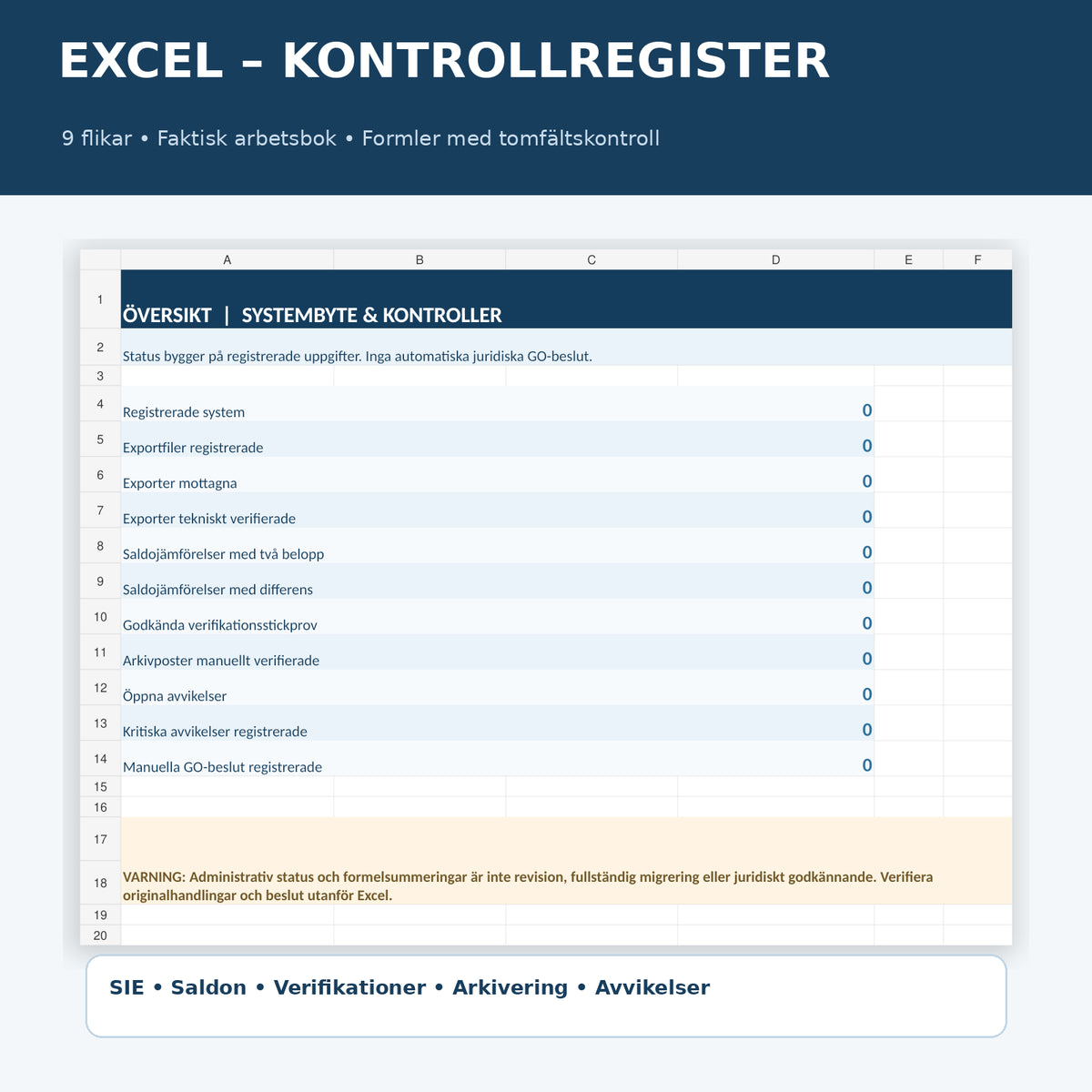
| Excel: SIE and Balance Register | Nine tabs for systems, export files, balances, verification sample, archiving, deviations, and decisions. | Swedish | XLSX; editable register |
The Excel Tool and Tested Functionality
The workbook has nine tabs: Read Me, Overview, System, Export Files, Balances, Verification Sample, Archiving, Deviations, and Decisions. The balance check shows a difference only when both compared amounts are numeric. Both 100 compared with 100 (0 difference) and 100 compared with 0 (−100 difference) have been tested; a missing source balance results in a blank difference result instead of a misleading zero. The overview counts registered comparisons and deviations.
The register provides administrative checks and overview; it does not automatically approve imports, transfers, closing of accounts, retention, or compliance. Fictional tests are not included in the delivered customer version.
How to Use the Product
- Establish the company, financial year, source and target systems, and responsible parties.
- Determine which registers, verifications, and periods must be retained and remain accessible.
- Export in the actual supported SIE type and log the file, date, and source; separately check what the SIE file does not contain.
- Import into your own software, check the result, and compare balances, including zero values.
- Sample verifications and ensure the ability to retrieve associated supporting documents and processing history.
- Document deviations and the plan for continued readability, archiving, and security.
- Make an actual Go/No-Go decision with responsible parties and archive the final evidence.
Legal and Important Limitations
Accounting Act (1999:1078): The party responsible for accounting has the statutory responsibility. Chapter 4, Section 1; Chapter 5, Section 11; and Chapter 7, Sections 1–2 and 6 are relevant to orderly accounting, system documentation, processing history, retention, accessibility, and transfer of accounting information. The general rule is retention until the end of the seventh year after the calendar year in which the financial year ended. Exceptions and special rules require separate assessment.
Accounting Board Guidance: The Accounting Board's guidance, including BFNAR 2013:2, is relevant to how accounting and archiving should be performed. An Excel register in this package is not accounting software. See the Accounting Board's questions and answers about accounting software.
SIE: Standardized industry format for transferring accounting data, not a format prescribed by the Accounting Act itself. SIE types have different contents; an export test and check of original supporting documents are required. SIE format documentation.
Personal Data: If personal data is handled by the supplier or processor, GDPR and personal data processor agreements may require specific agreements on return, deletion, and continued retention. IMY on processor agreements. Do not disclose passwords or authentication codes in template files.
Compare with Related Documents
Changing Accounting Firms refers to the handover of assignments and documents between consulting firms. General Data Migration Plan covers field mapping and technical system change. This package focuses on the check of accounting data, SIE type, zero balances, verification sample, and retention chain when changing accounting software.
Frequently Asked Questions
Is one SIE file enough to close the old software?
No. Check which SIE type the file has, which supporting documents are included, and how verifications, history, and necessary archive data can continue to be retrieved. A successful import is not an archiving certificate.
Is SIE export a legal requirement?
No. The Accounting Act requires that accounting information be completed and retained according to applicable rules; SIE is an industry format for data exchange. Companies may need other files and supporting documents.
What happens if one of the balances is zero?
Excel treats zero as a valid numeric balance. A missing value is not mistaken for zero and therefore does not result in an automatically calculated difference.
Can I record directly in the Excel sheet?
No. The Excel workbook is a register for documentation and checks, not accounting software or an automated chart of accounts.
Do I need to save the data from the old system?
The company must meet applicable archiving and access requirements. This may require archived original supporting documents, system documentation, processing history, and a tested solution for readability even after a system change.
Are the PDF files digitally fillable?
They are searchable and printable but are not interactive PDF forms. Fill in the editable Word documents and then create your own final versions.
Are all documents in English?
No. The main templates and Excel are in Swedish. The English User Guide is a separate set of instructions for the Swedish files.
Has the material been reviewed by an accounting consultant or lawyer?
No independent external accounting consultant or lawyer has reviewed this file version. An internal AI-assisted source review and technical file tests have been performed. The product does not guarantee legal compliance.
Related Resources and Source Transparency
Guide: Changing Accounting Software – SIE, Export, and Archiving, changing accounting firms, and data migration plan. Sources: Accounting Act, Accounting Board, and SIE format.
Version 1.0 – November 17, 2026. Internal AI-assisted legal source check of the specified provisions on the same date; no independent legal expert review.